Gnome Software shows me firmware updates for my Thinkpad. If I click on “restart & updated” I see for a few seconds a status bar and “installing” instead of “update” and than the laptop reboots but afterwards the same update is shown again in Gnome Software.
My first guess would be the EFI partition is too small (having this article in mind). If you tried to install both updates at once, maybe you could try to install them one by one after each other.
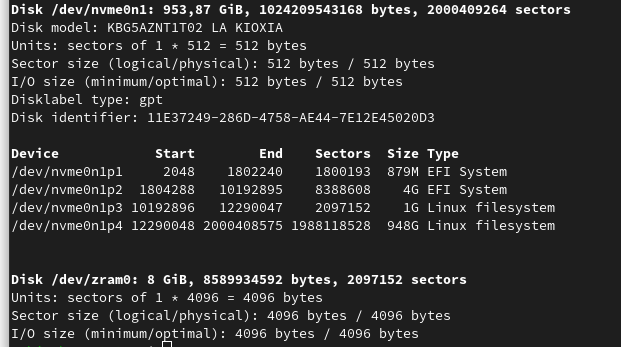
It is not unusual to encounter multiple EFI system partitions (ESP’s). I wonder if Lenovo uses the 2nd ESP. There is fwupd issue with multiple ESP’s with some discussion.
Your free space image doesn’t show the nvme0n1p2 ESP. You should be able to mount the partition using Gnome Disks and compare contents with the nvme0n1p1 ESP (mounted as /boot/efi). On my Dell box I have /boot/efi/EFI/dell with:
%  doas ls -l /boot/efi/EFI/dell/bios/recovery
total 23612
-rwx------. 1 root root 12087399 Nov 11 17:24 BIOS_CUR.RCV
-rwx------. 1 root root 12086122 Sep 22 18:02 BIOS_PRE.rcv
and
~%  doas ls -l /boot/efi/EFI/dell/logs
total 8
-rwx------. 1 root root 761 Nov 28 09:49 diags_current.xml
-rwx------. 1 root root 761 Nov 28 09:49 diags_previous.xml
I would be nice to know if there is recent activity on the second ESP.
Do you have SecureBoot on? There have occasionally been system updates on my X1 Carbon which needed SecureBoot temporarily turned off. Which is not great, but, at least there’s some signing on the LVFS. (I was able to turn it back on after, and then further updates worked fine.)
This revealed the root of the issue. Running the command I got this error:
/run/media/root/PQSERVICE does not have sufficient space, required 90,1 MB, got 51,2 MB
But what is /run/media/root/PQSERVICE ? It looks like it is generated/mounted temporarily during the firmware update. How can I assign more storage to it?
PQSERVICE is used by Acer for hidden recovery partitions. Is your nvme drive original from Lenovo or possibly transfered from an Acer system?
What is the free space for the 2nd ESP? What does journalctl -s pqservice give?
It would be great if you could file a bug against gnome-software and complain that errors displayed by fwupdmgr are not displayed by gnome-software. That makes it very confusing for the end user, unable to figure out what’s wrong. The ticket should go here:
And then it would be great if you could file the /run/media/root/PQSERVICE does not have sufficient space issue to fwupd here:
I’d just like to share my thoughts on your question, but please take my answer with caution.
From my understanding, that partition is part of Ubuntu’s recovery, which should be safely removable if you have only Fedora installed and are sure you don’t want to restore Ubuntu at a later point in time. So you could probably just delete the partition and add the space to another partition. When you have only one EFI partition left, fwupdmgr should use your system’s EFI partition.
But those are only assumptions. If you try to remove the Ubuntu recovery partition, make sure you have a current backup.
It appears that the error is due to installing Fedora on a system intended to run Ubuntu, so unless Ubuntu users also run out of space, there may never be a proper fix.
Since the firmware update apparently attempted to use nvme0n1p2/EFI/PQSERVICE, you should be careful about what you delete. Also, you may need to recover the system in the future and that partition might be useful. You can use Gnome Disks to create (and later restore the whole partition or just the files you remove to temporarily make space) an image of that partition, delete some large files that are clearly for use with Ubuntu, and run the firmware update again. It is quite possible that the update will begin by restoring the files you removed, but it is worth trying.
The “pool” might be a good place to reclaim space, as the files should be available from Ubuntu servers (you should check). You might also consider restoring a minimal Ubuntu system, doing firmware updates there, and dual booting with Fedora. That way you should have access to vendor support as well as a larger community of users with the same hardware/software.
Thanks a lot everyone here for all the fast answers and suggestions! Without you I wouldn’t ended up at the right bug tracker with the right content to get it so fast solved!



 )
)