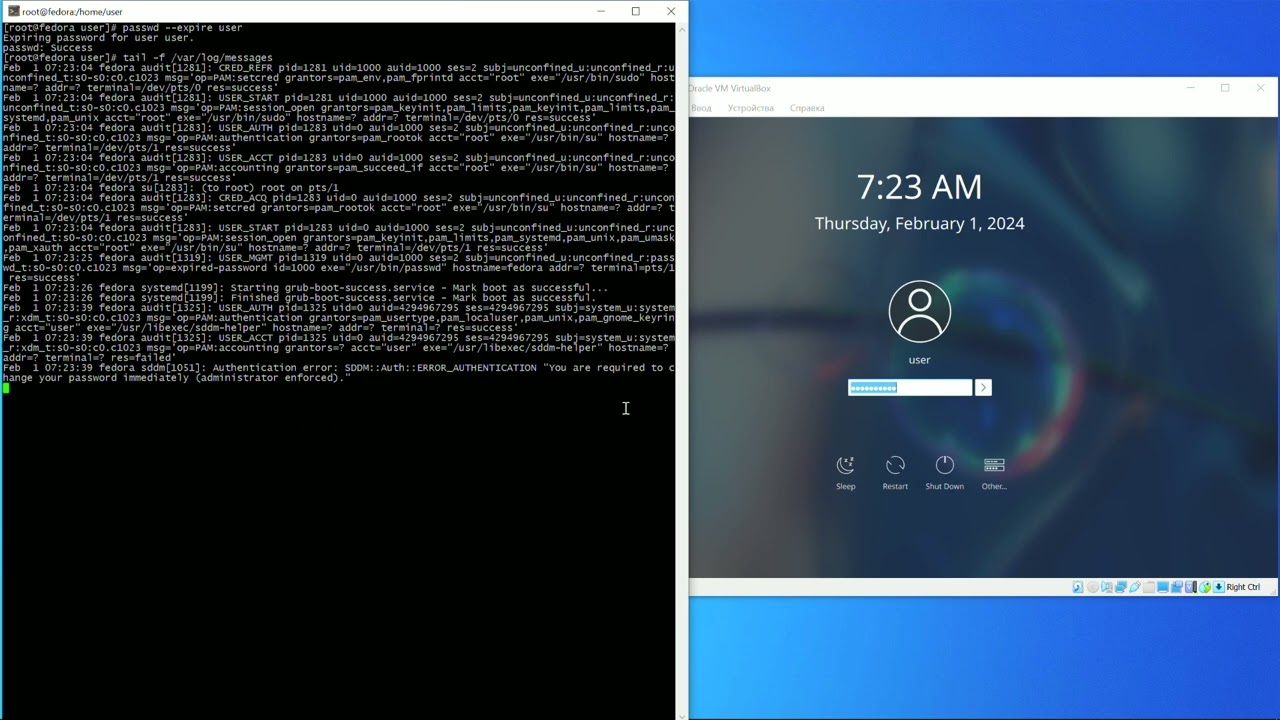
Fedora 39 stucks on login screen when password is expiried.
it just doesn’t show new password fields after password entering.
I know how to change it in another way via console, but I need change expired password via GUI.
If this is a home system and not accessible to many then certainly. It does not measurably add to security risks at home since you can use a secure password and remember it; as well as having access to the machine restricted to just a few, normally trusted, individuals.
Forcing frequent password changes tends to lead to weak & easily remembered and easy to hack (or even worse written down where they can be found) passwords in an enterprise environment so the earlier mantra of change the password frequently is shifting to create a strong password that is difficult to hack and keeping it for much longer periods.
Correct. As @computersavvy says it leads to bad security.
I cannot find it, but the seacurity researcher that come up with the expiry idea has since gone on the record as saying that that policy was a mistake.
Thanks for answering guys.
The point is, when admin creates new users for others, he shouldn’t know their password. So this new other user has to change it after login immediately. It’s standard feature of any OS, but it doesn’t work right here for some reason. Anyway OS shouldn’t just stuck here, Even if you want expireless password, it should tell user use password like this.
Using F39 Gnome, if I create a new user using the GUI I have the option to skip setting a password and have the user supply one at first login. Are you creating new user logins from the command-line?
For command-line, when you create a new user account named <login>, use chage --lastday 0 <login>:
       -d, --lastday LAST_DAY
           Set the number of days since January 1st, 1970 when the password was last changed. The date may also be
           expressed in the format YYYY-MM-DD (or the format more commonly used in your area). If the LAST_DAY is set
           to 0 the user is forced to change his password on the next log on.
I tried creating a user from the command line with:
% doas useradd -U -u 1002 -c "Ralph Yorke" ralph
% doas passwd -e ralph
Expiring password for user ralph.
passwd: Success
The Gnome login did not list the new user, but allowed me to enter the login name. It then prompted for a password, so it seems there is a disconnect between Gnome and command-line password management.