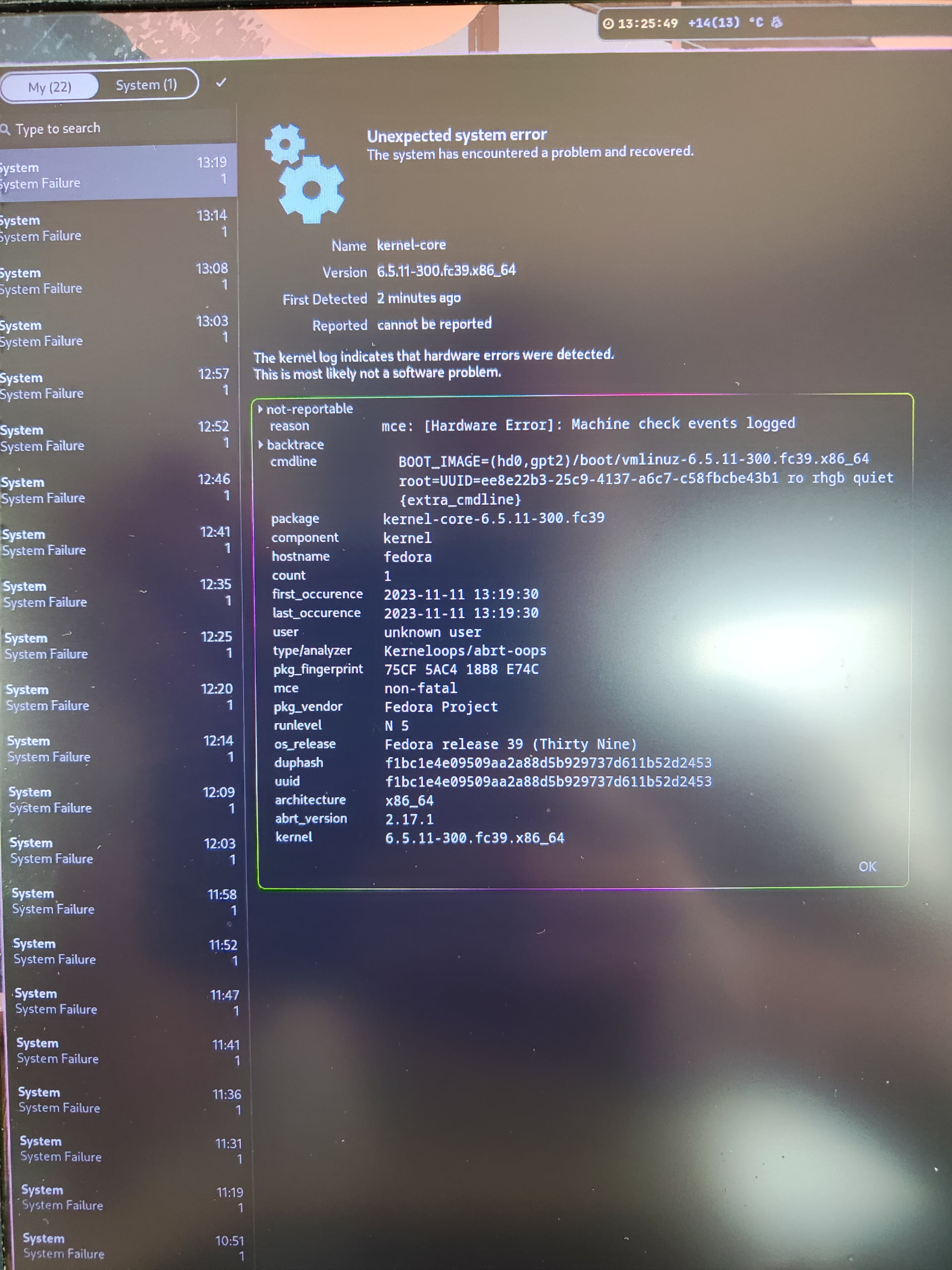
Hi,
I installed F39, latest iso and after boot I got this.
It is showing after boot only.
What is the reason ? Missing fw, kernel etc ?
How to fix it or if it not important how to hide it ?
Thx
Hi,
I installed F39, latest iso and after boot I got this.
It is showing after boot only.
What is the reason ? Missing fw, kernel etc ?
How to fix it or if it not important how to hide it ?
Thx
Please post text not pictures of text for us. You can use the </> button to do this.
Usually a machine check means that there is a hardware problem.
You can setup mcelog to collect the details of the machine check exceptions.
sudo dnf install mcelog
sudo systemctl enable --now mcelog
Then you can view MCE logs with the sudo /usr/sbin/mcelog command.
Hi,
Thank you for your answer . I got this :
marko@fedora ~]$ sudo systemctl enable --now mcelog
[marko@fedora ~]$ sudo /usr/sbin/mcelog
mcelog: ERROR: AMD Processor family 25: mcelog does not support this processor.  Please use the edac_mce_amd module instead.
CPU is unsupported
I guess mce is intel only. We need an AMD CPU knowledgeable person to comment then.
I tested and got the same error as noted by @marko94 . I have an AMD Rhyzen 7 CPU and occasionally get MCE notifications as well.
The noted edac_mce_amd module is already installed but because mcelog does not work I have been unable to determine how to enable proper logging to identify the mce cause.
what can we do ? I get that only on Fedora, or at least I only noticed it here. If it is nothing serious, maybe we can mask that notification/log ? Or update to newest kernel will help maybe ?
A bit of web detective work and i found this Running `mcelog` on an AMD processor - Unix & Linux Stack Exchange
It saying that mcelog has a replacement rasdaemon.
And its packaged for fedora.
Rasdaemon is running and also gives me reported errors that are no more informative.
I have not had any MCE events or rasdaemon events in the past few days so maybe the latest kernels (6.5.10 | 6.5.11) have solved the problem. Will have to wait and see if they are gone or if they return.
Lucky you… I just had it :
mce: [Hardware Error]: Machine check events logged
BOOT_IMAGE=(hd0,gpt2)/boot/vmlinuz-6.5.11-300.fc39.x86_64
Can you set up rasdaemon to collect information needed to debug this?
i tried, but stuck here :

[marko@fedora ~]$ rasdaemon -f
rasdaemon: Can't locate a mounted debugfs
I’m new to rasdaemon. Just installed and set it up.
What I did as root was:
dnf install rasdademon
systemctl enable --now rasdaemon.service
systemctl enable --now ras-mc-ctl.service
To view what has been logged you use the ras-mc-ctl command:
ras-mc-ctl --summary
After a while when the errors has occurred you should see some info with this I assume::
ras-mc-ctl --errors
You do not need to run rasdaemon as you tried to do.
[marko@fedora ~]$ systemctl enable --now rasdaemon.service
Created symlink /etc/systemd/system/multi-user.target.wants/rasdaemon.service → /usr/lib/systemd/system/rasdaemon.service.
[marko@fedora ~]$ systemctl enable --now ras-mc-ctl.service
Created symlink /etc/systemd/system/multi-user.target.wants/ras-mc-ctl.service → /usr/lib/systemd/system/ras-mc-ctl.service.
Job for ras-mc-ctl.service failed because the control process exited with error code.
See "systemctl status ras-mc-ctl.service" and "journalctl -xeu ras-mc-ctl.service" for details.
[marko@fedora ~]$ ras-mc-ctl --summary
DBI connect('dbname=/var/lib/rasdaemon/ras-mc_event.db','',...) failed: unable to open database file at /usr/sbin/ras-mc-ctl line 1168.
Can't call method "prepare" on an undefined value at /usr/sbin/ras-mc-ctl line 1172.
[marko@fedora ~]$ ras-mc-ctl --errors
DBI connect('dbname=/var/lib/rasdaemon/ras-mc_event.db','',...) failed: unable to open database file at /usr/sbin/ras-mc-ctl line 1328.
Can't call method "prepare" on an undefined value at /usr/sbin/ras-mc-ctl line 1332.
[marko@fedora ~]$ systemctl status ras-mc-ctl.service
× ras-mc-ctl.service - Initialize EDAC v3.0.0 Drivers For Machine Hardware
     Loaded: loaded (/usr/lib/systemd/system/ras-mc-ctl.service; enabled; preset: disabled)
    Drop-In: /usr/lib/systemd/system/service.d
             └─10-timeout-abort.conf
     Active: failed (Result: exit-code) since Sun 2023-11-12 15:58:06 CET; 28s ago
    Process: 10766 ExecStart=/usr/sbin/ras-mc-ctl --register-labels (code=exited, status=1/FAILURE)
   Main PID: 10766 (code=exited, status=1/FAILURE)
        CPU: 28ms

Nov 12 15:58:06 fedora systemd[1]: Starting ras-mc-ctl.service - Initialize EDAC v3.0.0 Drivers For Machine Hardwa>
Nov 12 15:58:06 fedora systemd[1]: ras-mc-ctl.service: Main process exited, code=exited, status=1/FAILURE
Nov 12 15:58:06 fedora systemd[1]: ras-mc-ctl.service: Failed with result 'exit-code'.
Nov 12 15:58:06 fedora systemd[1]: Failed to start ras-mc-ctl.service - Initialize EDAC v3.0.0 Drivers For Machine>
lines 1-13/13 (END)
I dont know what is wrong 
As ROOT! You cannot administer a system as a normal user.
sorry, my mistake :
[marko@fedora ~]$ sudo ras-mc-ctl --summary
No Memory errors.

No PCIe AER errors.

No Extlog errors.

No devlink errors.
No disk errors.
No Memory failure errors.

MCE records summary:
	12 Corrected error, no action required. errors
[marko@fedora ~]$ sudo ras-mc-ctl --errors
No Memory errors.

No PCIe AER errors.

No Extlog errors.

No devlink errors.

No disk errors.

No Memory failure errors.

MCE events:
1 2023-11-12 16:00:31 +0100 error: Corrected error, no action required., CPU 2, bank Unified Memory Controller (bank=15), mcg mcgstatus=0, mci Error_overflow CECC, mcgcap=0x00000119, status=0xdc204000000c011b, addr=0xd806d240, misc=0xd01a000001000000, walltime=0x6550e88f, cpuid=0x00a40f41, bank=0x0000000f
2 2023-11-12 16:00:31 +0100 error: Corrected error, no action required., CPU 2, bank Unified Memory Controller (bank=16), mcg mcgstatus=0, mci Error_overflow CECC, mcgcap=0x00000119, status=0xdc204000000c011b, addr=0xd801cf80, misc=0xd01a000001000000, walltime=0x6550e88f, cpuid=0x00a40f41, bank=0x00000010
3 2023-11-12 16:00:31 +0100 error: Corrected error, no action required., CPU 2, bank Unified Memory Controller (bank=17), mcg mcgstatus=0, mci Error_overflow CECC, mcgcap=0x00000119, status=0xdc204000000c011b, addr=0xd808cf40, misc=0xd01a000001000000, walltime=0x6550e88f, cpuid=0x00a40f41, bank=0x00000011
4 2023-11-12 16:00:31 +0100 error: Corrected error, no action required., CPU 2, bank Unified Memory Controller (bank=18), mcg mcgstatus=0, mci Error_overflow CECC, mcgcap=0x00000119, status=0xdc204000000c011b, addr=0xd800cf40, misc=0xd01a000001000000, walltime=0x6550e88f, cpuid=0x00a40f41, bank=0x00000012
5 2023-11-12 16:05:58 +0100 error: Corrected error, no action required., CPU 2, bank Unified Memory Controller (bank=15), mcg mcgstatus=0, mci Error_overflow CECC, mcgcap=0x00000119, status=0xdc204000000c011b, addr=0xd805d400, misc=0xd01a000001000000, walltime=0x6550e9d6, cpuid=0x00a40f41, bank=0x0000000f
6 2023-11-12 16:05:58 +0100 error: Corrected error, no action required., CPU 2, bank Unified Memory Controller (bank=16), mcg mcgstatus=0, mci Error_overflow CECC, mcgcap=0x00000119, status=0xdc204000000c011b, addr=0xd805bf00, misc=0xd01a000001000000, walltime=0x6550e9d6, cpuid=0x00a40f41, bank=0x00000010
7 2023-11-12 16:05:58 +0100 error: Corrected error, no action required., CPU 2, bank Unified Memory Controller (bank=17), mcg mcgstatus=0, mci Error_overflow CECC, mcgcap=0x00000119, status=0xdc204000000c011b, addr=0x30515fc0, misc=0xd01a000001000000, walltime=0x6550e9d6, cpuid=0x00a40f41, bank=0x00000011
8 2023-11-12 16:05:58 +0100 error: Corrected error, no action required., CPU 2, bank Unified Memory Controller (bank=18), mcg mcgstatus=0, mci Error_overflow CECC, mcgcap=0x00000119, status=0xdc204000000c011b, addr=0xd806d380, misc=0xd01a000001000000, walltime=0x6550e9d6, cpuid=0x00a40f41, bank=0x00000012
9 2023-11-12 16:11:26 +0100 error: Corrected error, no action required., CPU 2, bank Unified Memory Controller (bank=15), mcg mcgstatus=0, mci Error_overflow CECC, mcgcap=0x00000119, status=0xdc204000000c011b, addr=0xd801d200, misc=0xd01a000001000000, walltime=0x6550eb1e, cpuid=0x00a40f41, bank=0x0000000f
10 2023-11-12 16:11:26 +0100 error: Corrected error, no action required., CPU 2, bank Unified Memory Controller (bank=16), mcg mcgstatus=0, mci Error_overflow CECC, mcgcap=0x00000119, status=0xdc204000000c011b, addr=0x30517d00, misc=0xd01a000001000000, walltime=0x6550eb1e, cpuid=0x00a40f41, bank=0x00000010
11 2023-11-12 16:11:26 +0100 error: Corrected error, no action required., CPU 2, bank Unified Memory Controller (bank=17), mcg mcgstatus=0, mci Error_overflow CECC, mcgcap=0x00000119, status=0xdc204000000c011b, addr=0x30517f00, misc=0xd01a000001000000, walltime=0x6550eb1e, cpuid=0x00a40f41, bank=0x00000011
12 2023-11-12 16:11:26 +0100 error: Corrected error, no action required., CPU 2, bank Unified Memory Controller (bank=18), mcg mcgstatus=0, mci Error_overflow CECC, mcgcap=0x00000119, status=0xdc204000000c011b, addr=0x30792fc0, misc=0xd01a000001000000, walltime=0x6550eb1e, cpuid=0x00a40f41, bank=0x00000012
Interesting. You are seeing recoverable memory errors.
Have look in a days time at the number of errors.
Let us know tomorrow what the count is.
What that means ? Something bad or ?
If it is rare then it is the hardware doing what it is designed to do.
If it is frequent then you have a problem to work on.
Once you know the rate of errors then it will be clearer what to recommend.
How much memory does your system have?
16 gb RAM