cat -vbET '/etc/os-release' | Select-String 'CPE_NAME' has only ever returned cpe:/o:fedoraproject:fedora:40, but I’ve upgraded my packages many times. Usually every night, for approximately 4 months. Apologies for not being able to provide a better identifier - I’ve asked How to acquire specific release of installed OS? but not received an actionable answer yet.
Noteworthily, a few days ago, I endeavoured to install Windows 11 to attempt to diagnose whether Random Indefinite System Hang and crash - #10 by rokejulianlockhart was the fault of amdgpu drivers bundled in the kernel, or a fault with my hardware. I’d also been having trouble witn a network card’s Bluetooth 5.1 connection, which I’d noticed had been outputting a significant amount of iwlwifi errors in dmesg.
The first few times I installed Windows, I would immediately see a Startup Repair dialog on the bootloader to initiate chkdsk, and it would then BSOD and bootloop. After scouring the internet, I learnt that some PCIe network cards using Intel chips can cause significant problems with Windows. Indeed, removing my PCIe x2 BT 5.1 and Wi-Fi 6 card elimited 99% of the iwlwifi errors and allowed Windows to install without fault. I don’t use that card anymore, because although it might be significantly better at its job than my motherboard’s in-built one, it appears to introduce both visible and invisible problems across OSes.
I’ve installed Windows 11 Pro 24H1 or 24H2 (I’m on Release Preview). However, solely one iwlwifi error remains in dmesg when booting Fedora, so I’d like to diagnose that too, to ensure that I’ve no additional as-yet unknown problems with my build. Note that the chipset I’m using now is in-built to the motherboard, and consequently can solely be disabled on a hardware level from the UEFI’s GUI.
-
inxi -Fzxxreturns
-
System:
  Kernel: 6.9.7-200.fc40.x86_64 arch: x86_64 bits: 64 compiler: gcc
    v: 2.41-37.fc40
  Desktop: KDE Plasma v: 6.1.1 tk: Qt v: N/A wm: kwin_wayland dm: SDDM
    Distro: Fedora Linux 40 (KDE Plasma)
Machine:
  Type: Desktop System: ASRock product: X670E Taichi v: N/A
    serial: <superuser required>
  Mobo: ASRock model: X670E Taichi serial: <superuser required>
    UEFI: American Megatrends LLC. v: 1.21 date: 04/26/2023
Battery:
  Device-1: hidpp_battery_0 model: Logitech Wireless Mouse MX Master 3
    serial: <filter> charge: 100% (should be ignored) status: discharging
CPU:
  Info: 6-core model: AMD Ryzen 5 7600X bits: 64 type: MT MCP arch: Zen 4
    rev: 2 cache: L1: 384 KiB L2: 6 MiB L3: 32 MiB
  Speed (MHz): avg: 2255 high: 5246 min/max: 400/5453 cores: 1: 400 2: 400
    3: 4351 4: 5161 5: 400 6: 400 7: 400 8: 4360 9: 5246 10: 5147 11: 400
    12: 400 bogomips: 112809
  Flags: avx avx2 ht lm nx pae sse sse2 sse3 sse4_1 sse4_2 sse4a ssse3 svm
Graphics:
  Device-1: AMD Navi 10 [Radeon RX 5600 OEM/5600 XT / 5700/5700 XT]
    vendor: XFX Pine driver: amdgpu v: kernel arch: RDNA-1 pcie: speed: 16 GT/s
    lanes: 16 ports: active: DP-1 empty: DP-2,DP-3,HDMI-A-1 bus-ID: 03:00.0
    chip-ID: 1002:731f
  Device-2: AMD Raphael driver: amdgpu v: kernel arch: RDNA-2 pcie:
    speed: 16 GT/s lanes: 16 ports: active: none empty: DP-4, DP-5, DP-6,
    HDMI-A-2, Writeback-1 bus-ID: 59:00.0 chip-ID: 1002:164e temp: 35.0 C
  Device-3: Logitech BRIO Ultra HD Webcam driver: snd-usb-audio,uvcvideo
    type: USB rev: 2.1 speed: 480 Mb/s lanes: 1 bus-ID: 3-3:4 chip-ID: 046d:085e
  Display: wayland server: Xwayland v: 24.1.0 compositor: kwin_wayland
    driver: N/A display-ID: 0
  Monitor-1: DP-1 res: 2560x1440 size: N/A
  API: EGL v: 1.5 platforms: device: 0 drv: radeonsi device: 1 drv: radeonsi
    device: 2 drv: swrast gbm: drv: radeonsi surfaceless: drv: radeonsi wayland:
    drv: radeonsi x11: drv: radeonsi
  API: OpenGL v: 4.6 compat-v: 4.5 vendor: amd mesa v: 24.1.2 glx-v: 1.4
    direct-render: yes renderer: AMD Radeon RX 5700 (radeonsi navi10 LLVM
    18.1.6 DRM 3.57 6.9.7-200.fc40.x86_64) device-ID: 1002:731f
    display-ID: :0.0
  API: Vulkan v: 1.3.283 surfaces: xcb,xlib,wayland device: 0
    type: discrete-gpu driver: N/A device-ID: 1002:731f device: 1
    type: integrated-gpu driver: N/A device-ID: 1002:164e device: 2 type: cpu
    driver: N/A device-ID: 10005:0000
Audio:
  Device-1: AMD Navi 10 HDMI Audio driver: snd_hda_intel v: kernel pcie:
    speed: 16 GT/s lanes: 16 bus-ID: 03:00.1 chip-ID: 1002:ab38
  Device-2: AMD Rembrandt Radeon High Definition Audio driver: snd_hda_intel
    v: kernel pcie: speed: 16 GT/s lanes: 16 bus-ID: 59:00.1 chip-ID: 1002:1640
  Device-3: AMD Family 17h/19h HD Audio driver: N/A pcie: speed: 16 GT/s
    lanes: 16 bus-ID: 59:00.6 chip-ID: 1022:15e3
  Device-4: Logitech BRIO Ultra HD Webcam driver: snd-usb-audio,uvcvideo
    type: USB rev: 2.1 speed: 480 Mb/s lanes: 1 bus-ID: 3-3:4 chip-ID: 046d:085e
  Device-5: Generic USB Audio driver: hid-generic,snd-usb-audio,usbhid
    type: USB rev: 2.0 speed: 480 Mb/s lanes: 1 bus-ID: 5-8:3 chip-ID: 26ce:0a06
  Device-6: TONOR TC30 Audio Device driver: snd-usb-audio type: USB rev: 1.1
    speed: 12 Mb/s lanes: 1 bus-ID: 5-9.2:5 chip-ID: 5678:1234
  API: ALSA v: k6.9.7-200.fc40.x86_64 status: kernel-api
  Server-1: PipeWire v: 1.0.7 status: active with: 1: pipewire-pulse
    status: active 2: wireplumber status: active 3: pipewire-alsa type: plugin
    4: pw-jack type: plugin
Network:
  Device-1: Intel Wi-Fi 6E AX210/AX1675 2x2 [Typhoon Peak]
    vendor: Rivet Networks Killer driver: iwlwifi v: kernel pcie: speed: 5 GT/s
    lanes: 1 bus-ID: 49:00.0 chip-ID: 8086:2725
  IF: wlp73s0 state: down mac: <filter>
  Device-2: Realtek Killer E3000 2.5GbE vendor: ASRock driver: r8169
    v: kernel pcie: speed: 5 GT/s lanes: 1 port: a000 bus-ID: 4a:00.0
    chip-ID: 10ec:3000
  IF: enp74s0 state: up speed: 100 Mbps duplex: full mac: <filter>
Bluetooth:
  Device-1: Intel AX210 Bluetooth driver: btusb v: 0.8 type: USB rev: 2.0
    speed: 12 Mb/s lanes: 1 bus-ID: 5-7:2 chip-ID: 8087:0032
  Report: btmgmt ID: hci0 rfk-id: 0 state: up address: <filter> bt-v: 5.3
    lmp-v: 12
Drives:
  Local Storage: total: 4.1 TiB used: 1.92 TiB (46.9%)
  ID-1: /dev/nvme0n1 vendor: SK Hynix model: PC401 HFS256GD9TNG-62A0A
    size: 238.47 GiB speed: 31.6 Gb/s lanes: 4 serial: <filter> temp: 30.9 C
  ID-2: /dev/nvme1n1 vendor: Addlink model: M.2 PCIE G4x4 NVMe
    size: 1.82 TiB speed: 63.2 Gb/s lanes: 4 serial: <filter> temp: 30.9 C
  ID-3: /dev/nvme2n1 vendor: Samsung model: SSD 980 PRO 250GB
    size: 232.89 GiB speed: 63.2 Gb/s lanes: 4 serial: <filter> temp: 32.9 C
  ID-4: /dev/nvme3n1 vendor: Addlink model: M.2 PCIE G4x4 NVMe
    size: 1.82 TiB speed: 63.2 Gb/s lanes: 4 serial: <filter> temp: 40.9 C
Partition:
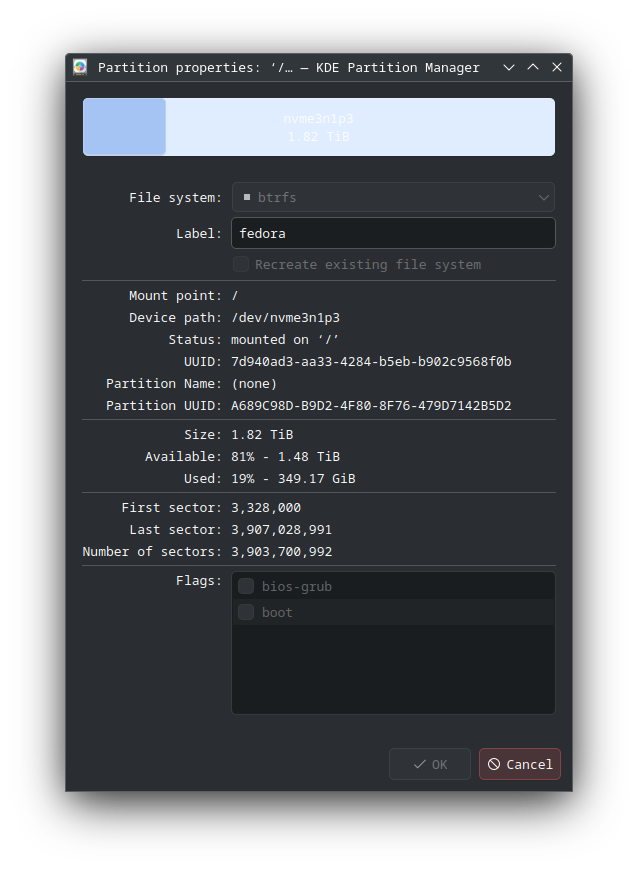
  ID-1: / size: 1.82 TiB used: 349.18 GiB (18.8%) fs: btrfs
    dev: /dev/nvme3n1p3
  ID-2: /boot size: 973.4 MiB used: 386.3 MiB (39.7%) fs: ext4
    dev: /dev/nvme3n1p2
  ID-3: /boot/efi size: 598.8 MiB used: 50 MiB (8.4%) fs: vfat
    dev: /dev/nvme3n1p1
  ID-4: /home size: 1.82 TiB used: 349.18 GiB (18.8%) fs: btrfs
    dev: /dev/nvme3n1p3
Swap:
  ID-1: swap-1 type: zram size: 8 GiB used: 1.24 GiB (15.6%) priority: 100
    dev: /dev/zram0
Sensors:
  System Temperatures: cpu: 46.2 C mobo: N/A
  Fan Speeds (rpm): N/A
  GPU: device: amdgpu temp: 36.0 C device: amdgpu temp: 39.0 C mem: 40.0 C
    fan: 3351
Info:
  Memory: total: 32 GiB note: est. available: 30.47 GiB
    used: 12.66 GiB (41.6%)
  Processes: 504 Power: uptime: 1h 9m wakeups: 0 Init: systemd v: 255
    target: graphical (5) default: graphical
  Packages: 42 pm: flatpak pkgs: 33 pm: snap pkgs: 9 Compilers: clang: 17
    gcc: 14.1.1 Shell: pwsh running-in: script inxi: 3.3.34
My / drive is 23% full: