I have installed Fedora 43 KDE on my laptop, wanted to preserve the win11 recovery partition and save up some space.
I had a win11 partition, empty space, and recovery space.
I wanted to: wipe windows reserve some space for a separate data partition, and preserve windows recovery partition.
I selected customized partitioning, there I could only select: efinpartition, or recovery partition for the root and boot/efi partition.
I had to search the partition manager from the start menu. Anaconda did not have a button built in to open it, that would be desirable.
I had to edit partitions fro there, and was able to obtain my desired result.
It would be nice to have: 1) built in system to manage the partition (as in previous manager); 2) a button and text that explains that partitioning is managed autonomously through gparted/KDE partition manager/ whatever built in tool for the flavour.
Fedora 43 KDE Plasma Desktop uses the new WebUI Installer.
It already has the option to install alongside an existing OS if it was supported.
It would’ve appeared on Step 2 under "the “How would you list to install?” section as “Share this disk with other operating system”
If that option didn’t appear, then perhaps your Windows OS was installed in “Legacy/BIOS/CSM mode” while you booted the Fedora installer using UEFI mode.
Exactly what I was looking for.
Yes, it needs to be a bit more explicit, both because being an option essential in certain uses it should be imho an external button and not in the dot menu, that is more appropriate for “About” and “Report issue”. If it where a burger menu maybe I would’ve checked, but not a dot menu that usually is for more light options.
I will try this tool on my soon next installation, since i have to install fedora on another laptop too.
I am removing Windows, so I do not need Fedora to Share with other O.S.
It’s a laptop with Windows 11, as far as I remember you can’t even use legacy bios with Windows 11.
Also, my “special” installation:
O.S. fully installed on 3/4 of the SSD
side “data” partition that is mounted automatically
Windows Recovery dumped in his little 1gb partition
No swap, since Fedora defaults to zswap
Home folders Documents/Pictures/Music/Videos moved to the “data” partition, where they will be configured with specific permissions, and the soft-linked back in /home/username.
Final result: All my data is safe in a dedicated partition that does not bloat over time.
Why not make the partition as “/home” and call it a day?
Beacuse of all the “~/.local”, “~/.var” that fill up with Steam, Lutris, Heroic data (e.g. with the Proton downloads), that imho should be in the /var folder, and not in my home folder.
I could move those folders, but it is much easier to keep safe what I want to keep safe, and backup only that folder where I have my data.

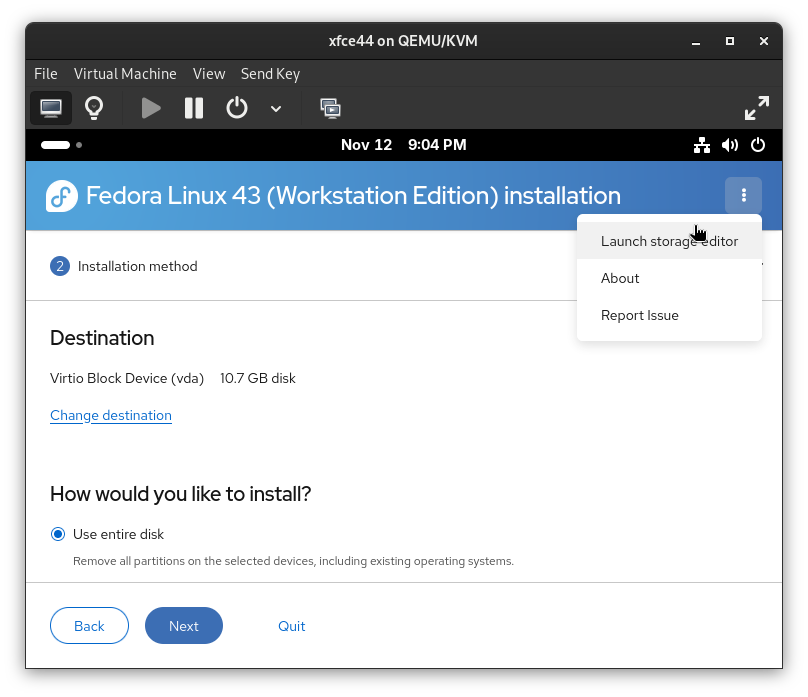

 menu:
menu:


