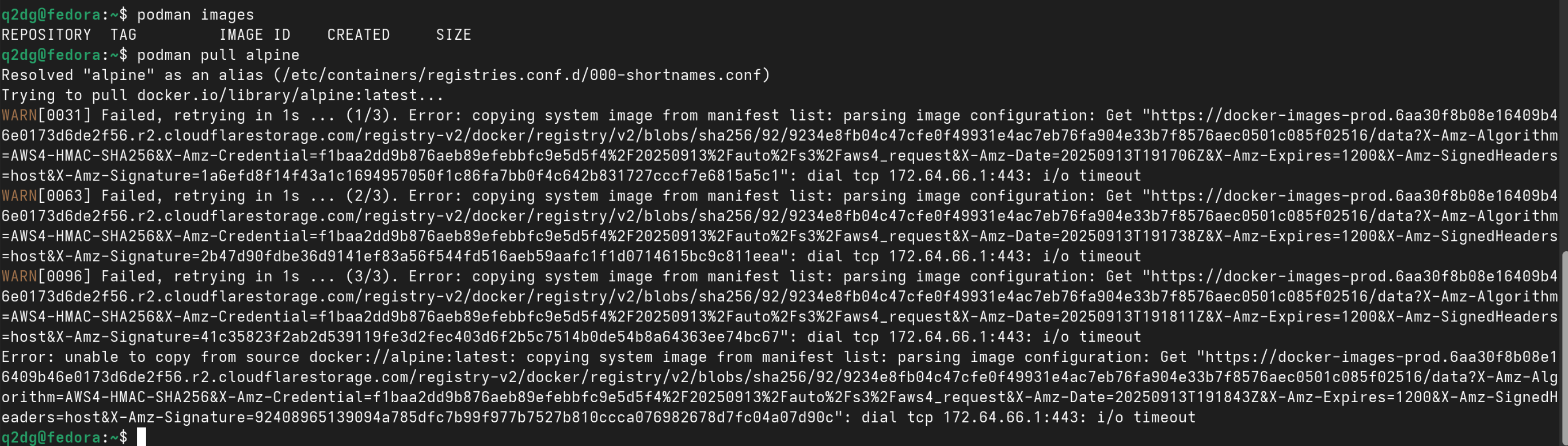
Hello. I’m running Fedora 42 and Podman 5.6.1 from its repositories.
When I run podman run --rm alpine ping -c 1 www.google.com I get this error…
Failed, retrying in 1s … (3/3). Error: copying system image from manifest list: parsing image configuration: Get “``https://docker-images-prod.6aa30f8b08e16409b46e0173d6de2f56.r2.cloudflarestorage.com/registry-v2/docker/registry/v2/blobs/sha256/92/9234e8fb04c47cfe0f49931e4ac7eb76fa904e33b7f8576aec0501c085f02516/data?X-Amz-Algorithm=AWS4-HMAC-SHA256&X-Amz-Credential=f1baa2dd9b876aeb89efebbfc9e5d5f4%2F20250913%2Fauto%2Fs3%2Faws4_request&X-Amz-Date=20250913T170652Z&X-Amz-Expires=1200&X-Amz-SignedHeaders=host&X-Amz-Signature=22fb1950ce88934ad8240b2a31c81e8c05c38db7fa612f379024576e6ceb728a”:`` dial tcp 172.64.66.1:443: i/o timeout ```
Error: unable to copy from source docker://alpine:latest: copying system image from manifest list: parsing image configuration: Get “``https://docker-images-prod.6aa30f8b08e16409b46e0173d6de2f56.r2.cloudflarestorage.com/registry-v2/docker/registry/v2/blobs/sha256/92/9234e8fb04c47cfe0f49931e4ac7eb76fa904e33b7f8576aec0501c085f02516/data?X-Amz-Algorithm=AWS4-HMAC-SHA256&X-Amz-Credential=f1baa2dd9b876aeb89efebbfc9e5d5f4%2F20250913%2Fauto%2Fs3%2Faws4_request&X-Amz-Date=20250913T170725Z&X-Amz-Expires=1200&X-Amz-SignedHeaders=host&X-Amz-Signature=19ba099135dfabedf7229bd75f342b49738f49fe9ba1d9fe881fb169d58d5481”:`` dial tcp 172.64.66.1:443: i/o timeout ```
…but when I run former command with sudo, it goes well.
I’ve read that in rootless mode Podman uses Pasta, but I haven’t found how to configure it to get access to Internet in this mode. I just want to pull registry images as a regular user, nothing more.
The way I read these errors is that podman cannot even pull the image, let alone start the container. (As such, IMO the title of your thread is misleading. The container isn’t even running, how could it have issues to connect to the internet?)
Can you try a separate podman pull first:
~ ❯ podman images
REPOSITORY                     TAG         IMAGE ID      CREATED      SIZE
docker.io/syncthing/syncthing  2           059cd1dbac55  9 hours ago  51 MB

~ ❯ podman pull alpine
Resolved "alpine" as an alias (/etc/containers/registries.conf.d/000-shortnames.conf)
Trying to pull docker.io/library/alpine:latest...
Getting image source signatures
Copying blob 9824c27679d3 skipped: already exists
Copying config 9234e8fb04 done   |
Writing manifest to image destination
9234e8fb04c47cfe0f49931e4ac7eb76fa904e33b7f8576aec0501c085f02516

~ ❯ podman images
REPOSITORY                     TAG         IMAGE ID      CREATED       SIZE
docker.io/syncthing/syncthing  2           059cd1dbac55  9 hours ago   51 MB
docker.io/library/alpine       latest      9234e8fb04c4  2 months ago  8.61 MB
Possibly the image is already in the registry for your root user because of an earlier pull. What does sudo podman images print?
Pasta is for the network in the container(s), not for pulling.
Hi, I just registered to answer this issue. The culprit is " LALIGA EA Sports" (spanish football league) with their “anti-piracy” blocks, I’m also having difficulties and found out this ip is in Cloundlare’s ip range.