I have a PC with a RTX 4070 and an HDR monitor. Since I want to use the HDR function with my monitor and also want to be able to run it at 240 fps with dithering, I have to install the proprietary Nvidia drivers. Unfortunately, when I do so, I stop getting any picture after rebooting. On the first time, I get a picture for less than I second from boot up, but even that disappears if I restart the computer again. Sadly, I wasn’t fast enough to photograph it. This issue happens no matter which of the three options I choose from GNU GRUB. Is there any way to fix this, preferable without having to reinstall the OS?
Please post modinfo -l nvidia, modinfo -F version nvidia, dnf list --installed \*nvidia\*, and inxi -Fzxx all as preformatted text using the </> button.
You can get that information by logging in to the text screen with ctrl + alt + F3.
You should also be able to boot to graphics mode using the nouveau driver by opening the grub boot menu (hold the shift key when first powering on) and press e to edit the grub entry. Remove the rd.driver.blacklist=nouveau,nova_core modprobe.blacklist=nouveau,nova_core from the line that begins with linux then continue booting with ctrl + F10
I can’t get into the text screen with Ctrl + alt + F3, most likely because the disk is encrypted, and the command doesn’t work without putting in the passphrase to decrypt it. I tried putting it in blind, but without success.
Removing rd.driver.blacklist=nouveau,nova_core modprobe.blacklist=nouveau,nova_core and then booting does work, however I only get a functional graphics mode until I log in. After that, I just get a black screen with my cursor and nothing else visible.
When I move the cursor around rapidly, it grows and then reverts to its original size.
I’m able to enter the text screen in this mode. modinfo -l nvidia gave the response Dual MIT/GLP
modinfo -F version nvidia : 580.105.08
dnf list --installed \*nvidia\* : Installed Packages akmod-nvidia.x86_64 3:580.105.08-1.fc43 <unknown> kmod-nvidia-6.17.9-300.fc43.x86_64.x86_64 3:580.105.08-1.fc43 @command line nvidia-gpu-firmware.noarch 20251125-1.fc43 <unknown> nvidia-modprobe.x86_64 3:580.105.08-1.fc43 <unknown> nvidia-settings.x86_64 3:580.105.08-1.fc43 <unknown> xorg-x11-drv-nvidia.x86_64 3:580.105.08-1.fc43 <unknown> xorg-x11-drv-nvidia-cuda-libs.x86_64 3:580.105.08-1.fc43 <unknown> xorg-x11-drv-nvidia-kmodsrc.x86_64 3:580.105.08-1.fc43 <unknown> xorg-x11-drv-nvidia-libs.x86_64 3:580.105.08-1.fc43 <unknown> xorg-x11-drv-nvidia-power.x86_64 3:580.105.08-1.fc43 <unknown>
inxi -Fzxx : System:
Kernel:6.17.9-300.fc43.x86_64arch:x86_64bits:64compiler: gcc: 15.2.1Console:tty 3DM:SDDMDistro:Fedora Linux 43 (KDE Plasma Desktop Edition)Machine:
Type:DesktopSystem:ASUSproduct:N/Av:N/Aserial: <superuser required>
Mobo:ASUSTeKmodel:PRIME B650-PLUSv:Rev 1.xxserial:<superuser required>part-nu: SKU
UEFI:American Megatrendsv:2613date:04/12/2024
Battery:
Device-1:nintendo_switch_controller_battery_0003:057E:2009.0004model:N/Aserial: N/A
charge:fullstatus:full
CPU:
Info:8-coremodel:AMD Ryzen 7 7700Xbits:64type:MT MCParch:Zen 4rev:2cache:
L1:512 KiBL2:8 MiBL3: 32 MiB
Speed (MHz): avg:3001min/max:433/5535boost:enabledcores: 1:30012:30013:30014: 3001
5:30016:30017:30018:30019:300110:300111:300112:300113:300114:300115: 3001
16:3001bogomips: 143996
Flags-basic: avx avx2 ht lm nx pae sse sse2 sse3 sse4_1 sse4_2 sse4a ssse3 svm
Graphics:
Device-1:NVIDIA AD104 [GeForce RTX 4070]vendor:CardExpertdriver:nouveauv: kernel
arch:Lovelacepcie: speed:2.5 GT/slanes:16ports: active:DP-4empty: DP-2,DP-3,HDMI-A-2
bus-ID:01:00.0chip-ID: 10de:2786
Device-2:Advanced Micro Devices [AMD/ATI] Raphaelvendor:ASUSTeKdriver:amdgpuv: kernel
arch:RDNA-2pcie: speed:16 GT/s lanes 16ports: active:noneempty: DP-1,HDMI-A-1,Writeback-1
bus-ID:0d:00.0chip-ID: 1002:164e temр. 35.0 С
Device-3:Realtek USB Cameradriver:uvcvideotype:USB rev: 2.0speed:480 Mb/slanes: 1
bus-ID:5-2.3:3chip-ID: 0bda:0512
Display:unspecifiedserver:Xwaylandv:24.1.9compositor:kwin_waylanddriver: gpu: nouveau
tty: 320x90
Monitor-1:DP-4model:GN10res:2560x1440dpi:109diag: 685mm (27")
API:EGLv:1.5platforms: device:0drv:zinkdevice:1drv:radeonsidevice:2drv: swrast
gbm: drv:zinksurfaceless: drv:zinkwayland: drv:zinkinactive:x11
API:OpenGLv:4.6compat-v:4.5vendor:mesav:25.2.7note: console (EGL sourced)
renderer: zink Vulkan 1.4(NVIDIA GeForce RTX 4070 (NVK AD104) (MESA NVK)), AMD Ryzen 7 7700X
8-Core Processor (radeonsi raphael_mendocino LLVM 21.1.5 DRM 3.64 6.17.9-300.fc43.x86_64),
llvmpipe (LLVM 21.1.5 256 bits)
API: Vulkan v:1.4.321surfaces:V/Adevice:0type:discrete-gpudriver: mesa mvk
device-ID:10de:2786device:1type:integrated-gpudriver: mesa radvdevice-ID: 1002:164e
device:2type:cpudriver:mesa llvmpipedevice-ID: 10005:0000
Info: Tools: api: clinfo, eglinfo, glxinfo, vulkaninfo de: kscreen-console, kscreen-doctor
gpu:nvidia-settingswl:wayland-infox11: xdriinfo, xdpyinfo, xprop, xrandr
Audio:
Device-1:NVIDIA AD104 High Definition Audiovendor:CardExpertdriver: snd_hda_intel
pcie: speed:2.5 GT/slanes:16bus-ID:01:00.1chip-ID: 10de:22bc
Device 2:Advanced Micro Devices [AMD/ATI] Radeon High Definition Audiovendor: ASUSTeK
driver:snd_hda_intelv:kernelpcie: speed:16 GT/slanes:16bus-ID: 0d:00.1
chip-ID: 1002:1640
Device-3:Advanced Micro Devices [AMD] Ryzen HD Audiovendor:ASUSTeKdriver: snd_hda_intel
v:kernelpcie: speed:16 GT/slanes:16bus-ID:0d:00.6chip-ID: 1022:15e3
Device-4:Realtek USB MICdriver:hid-generic,snd-usb-audio,usbhidtype:USBrev: 1.1
speed:12 Mb/slanes:1bus-ID:5-2.4:4chip-ID: 0bda:d571
API:ALSAv:k6.17.9-300.fc43.x86_64status: kernel-api
Server-1:PipeWirev:1.4.9status:activewith: 1:pipewire-pulsestates: active
2:wireplumberstatus:active3:pipewire-alsatype: plugin 4:pw-jacktype: plugin
Network:
Device-1:Realtek RTL8125 2.5GbEvendor:ASUSTeKdriver:r8169v:kernelpcie: speed 5 GT/s
lanes:1port:e000bus-ID:08:00.0chip-ID: 10ec:8125
IF:eno1state:upspeed:1000 Mbpsduplex:fullmac:<filter> Bluetooth:
Device-1:TP-Link UB500 Adapterdriver:btusbv:0.8type:USBrev:1.1speed:12 Mb/slanes: 1
bus-ID:1-4:3chip-ID: 2357:0604 Report:btmgmtID:hci0rfk-id:0state:upaddress:<filter>bt-v:5.1lvp-v: 10
Drives:
L**ocal Storage:total: 2.27 TIBused:** 84.33 GiB (3.6%)
ID-1:/dev/nvme0n1vendor:Samsungmodel:SSD 980 PRO 2TBsize:1.82 TiBspeed: 63.2 Gb/s
lanes:4serial:<filter>temp: 31.9 C
ID-2:/dev/nvme1n1vendor:Kingstonmodel:SNV2S500Gsize:465.76 GiBspeed: 63.2 GB/s
lanes:4seriel:<filter>temp: 29.9 C
Partition:
ID-1:/size 230.61 GiBused:83.65 GIB (36.3%)fs:btrfsdev: /dev/de-0
mapped: luks-ab4d0198-3bb2-4074-927b-4aac71f906a1
ID-2:/bootsize:1.9 GiBused:673.4 MB (34.6%)fs:ext4dev: dev/nvme1n1p3
ID-3:/boot/efisize:511 MiBused:19.3 MiB (3.8%)fs:vfartdev: /dev/nvme1n1p1
ID-4:/homesize:230.61 GiBused:83.65 6iG (36.3%)fs:btrfsdev: /dev/dm-0
mapped:luks-ab4d0198-3bb2-4074-927b-4aac71f906a1Swap:
ID-1:swар-1tуре:zramsize:8 GiBused:0 KiB (0.0%)priority:100 dev: /deb/zram0
I’m sorry
I should have mentioned that you needed to highlight the text after pasting then click the </> button.
The way you did it makes it all one long line and becomes nearly unreadable.
An alternative with the proper result is to place ``` on the line before the pasted text and on the line after the pasted text.
In any case there are 2 possibilities.
-
it is possible that the nvidia driver is corrupted and can be fixed for the currently booted kernel with
sudo akmods --rebuild --force --kernels $(uname -r) -
The second is that you may have secure boot enabled which prevents loading the nvidia module until the key has been imported into bios. Instructions for that are on the rpmfusion site as well as in the file
/usr/share/doc/akmods/README.secureboot. You still may need to do the command in step 1 after performing the import of the key and before the reboot which is the last step in the instructions noted.
1 Like
I edited it. Will try what you suggested tomorrow.
I noticed that your bios is almost 2 years old. From the asus website i find this (A new update)

Some problems are fixed by updating the system bios.
NOTE: updating the bios will mean you need to enroll the module signing key using mokutil again since the new bios will overwrite the existing entries.
Closer to more than 1.5 years, but yes, it was quite old. I did update it and then enrolled the secure boot key. Lastly, I did rebuild the driver.
Sadly, the problem still persists, no matter if secure boot is enabled or disable I get no display. No mater how often I rebuild the driver, nothing changes. Any idea what else could be the cause?
This isn’t supposed to be a guessing game. Show some logs…
journalctl --no-hostname --no-pager -b -k -g nvrm
Also try to revert to default display settings. 60Hz refresh rate etc.
1 Like
Sorry, I didn’t know that there was another command that could give you more info.
Here are the results:
Dez 12 15:43:06 kernel: NVRM: GPU 0000:01:00.0 is already bound to nouveau
Dez 12 15:43:06 kernel: NVRM: The NVIDIA probe routine was not called for 1 device(s).
Dez 12 15:43:06 kernel: NVRM: This can occur when another driver was loaded and
NVRM: obtained ownership of the NVIDIA device(s).
Dez 12 15:43:06 kernel: NVRM: Try unloading the conflicting kernel module (and/or
NVRM: reconfigure your kernel without the conflicting
NVRM: driver(s)), then try loading the NVIDIA kernel module
NVRM: again.Dez 12 15:43:06 kernel: NVRM: No NVIDIA devices probed.
Dez 12 15:43:06 kernel: NVRM: GPU 0000:01:00.0 is already bound to nouveau.
Dez 12 15:43:06 kernel: NVRM: The NVIDIA probe routine was not called for 1 device(s).
Dez 12 15:43:06 kernel: NVRM: This can occur when another driver was loaded and
NVRM: obtained ownership of the NVIDIA device(s).
Dez 12 15:43:06 kernel: NVRM: Try unloading the conflicting kernel module (and/or
NVRM: reconfigure your kernel without the conflicting
NVRM: driver(s)), then try loading the NVIDIA kernel module
NVRM: again.
Dez 12 15:43:06 kernel: NVRM: No NVIDIA devices probed.
Dez 12 15:43:07 kernel: NVRM: GPU 0000:01:00.0 is already bound to nouveau.
Dez 12 15:43:07 kernel: NVRM: The NVIDIA probe routine was not called for 1 device(s).
Dez 12 15:43:07 kernel: NVRM: This can occur when another driver was loaded and
NVRM: obtained ownership of the NVIDIA device(s).
Dez 12 15:43:07 kernel: NVRM: Try unloading the conflicting kernel module (and/or
NVRM: reconfigure your kernel without the conflicting
NVRM: driver(s)), then try loading the NVIDIA kernel module
NVRM: again.Dez 12 15:43:07 kernel: NVRM: No NVIDIA devices probed.
Dez 12 15:43:17 kernel: NVRM: GPU 0000:01:00.0 is already bound to nouveau.
Dez 12 15:43:17 kernel: NVRM: The NVIDIA probe routine was not called for 1 device(s).
Dez 12 15:43:17 kernel: NVRM: This can occur when another driver was loaded and
NVRM: obtained ownership of the NVIDIA device(s).
Dez 12 15:43:17 kernel: NVRM: Try unloading the conflicting kernel module (and/or
NVRM: reconfigure your kernel without the conflicting
NVRM: driver(s)), then try loading the NVIDIA kernel module

NVRM: again.
Dez 12 15:43:17 kernel: NVRM: No NVIDIA devices probed.
Dez 12 15:43:19 kernel: NVRM: GPU 0000:01:00.0 is already bound to nouveau.
Dez 12 15:43:19 kernel: NVRM: The NVIDIA probe routine was not called for 1 device(s).
Dez 12 15:43:19 kernel: NVRM: This can occur when another driver was loaded and
NVRM: obtained ownership of the NVIDIA device(s).
Dez 12 15:43:19 kernel: NVRM: Try unloading the conflicting kernel module (and/or
NVRM: reconfigure your kernel without the conflicting
NVRM: driver(s)), then try loading the NVIDIA kernel module
NVRM: again.Dez 12 15:43:19 kernel: NVRM: No NVIDIA devices probed.
Dez 12 16:43:31 kernel: NVRM: GPU 0000:01:00.0 is already bound to nouveau.
Dez 12 16:43:31 kernel: NVRM: The NVIDIA probe routine was not called for 1 device(s).
Dez 12 16:43:31 kernel: NVRM: This can occur when another driver was loaded and
NVRM: obtained ownership of the NVIDIA device(s).
Dez 12 16:43:31 kernel: NVRM: Try unloading the conflicting kernel module (and/or
NVRM: reconfigure your kernel without the conflicting
NVRM: driver(s)), then try loading the NVIDIA kernel module
NVRM: again.
Dez 12 16:43:31 kernel: NVRM: No NVIDIA devices probed.
Dez 12 16:43:31 kernel: NVRM: GPU 0000:01:00.0 is already bound to nouveau.
Dez 12 16:43:31 kernel: NVRM: The NVIDIA probe routine was not called for 1 device(s).
Dez 12 16:43:31 kernel: NVRM: This can occur when another driver was loaded and
NVRM: obtained ownership of the NVIDIA device(s).
Dez 12 16:43:31 kernel: NVRM: Try unloading the conflicting kernel module (and/or
NVRM: reconfigure your kernel without the conflicting
NVRM: driver(s)), then try loading the NVIDIA kernel module
NVRM: again.
Dez 12 16:43:31 kernel: NVRM: No NVIDIA devices probed.
Dez 12 16:44:16 kernel: NVRM: GPU 0000:01:00.0 is already bound to nouveau.
Dez 12 16:44:16 kernel: NVRM: The NVIDIA probe routine was not called for 1 device(s).
Dez 12 16:44:16 kernel: NVRM: This can occur when another driver was loaded and
NVRM: obtained ownership of the NVIDIA device(s)
Dez 12 16:44:16 kernel:	NVRM: Try unloading the conflicting kernel module (and/or
NVRM: reconfigure your kernel without the conflicting
NVRM: driver(s)), then try loading the NVIDIA kernel module
NVRM: again.
Dez 12 16:44:16 kernel: NVRM: No NVIDIA devices probed.
Hope it’s readable and helps.
This says that nouveau was already loaded so the nvidia driver could not be loaded.
Please give us the output of cat /proc/cmdline, cat /etc/kernel/cmdline, mokutil --sb-state, and dnf list --installed \*nvidia\*
The system will always try to load the nouveau driver first unless prevented by the kernel command line options.
If the nvidia driver was installed from the rpmfusion repo the kernel command lines in both locations should reflect that. If installed from some other source the command line may not have the proper options written and thus fail to prevent loading the nouveau driver.
is this log from an attempt to boot with the nvidia driver? I agree with @computersavvy this looks as if the nouveau driver was not blacklisted, which prevented nvidia kernel modules from being loaded into the kernel.
We need logs when you reproduce the ‘no display issue’.
Reproduce and either ssh from another system and run the journalctl command or, if that’s not possible, restart the system and run
journalctl --no-hostname --no-pager -b -1 -k -g nvrm
-b -1 selects the journal from the previous system boot. -b -2 would select the log before that etc.
Here are the results:
cat /proc/cmdline:
BOOT IMAGE=(hd1,gpt3)/uvmlinuz-6.17.9-300.fc43.x86_64 root=UUID=78ee0da8-88fc-4bd8-b742-33c11d782bcr ro rootflags=subvol=root rd.ruks.uuid=luks-ab4d0198-3bb2-4074-927b-4aac71f906a1 rhgb quiet
cat /etc/kernel/cmdline:
root=UUID=78ee0da8-88fc-4bd8-b742-33c11d782bcb ro rootflags=subvol=root rd.luks.uuid=luks-ab4d0198-3bb2-4074-927b-4aac71f906a1 rhgb quiet rd.driver.blacklist=nouveau,nova_core modprobe.blacklist=nouveau,nova_core
mokutil --sb-state:
SecureBoot enabled
dnf list –-installed \*nvidia\*:
akmod-nvidia.x86_64 3:580.105.08-1.fc43 <unknown> kmod-nvidia-6.17.9-300.fc43.x86_64.x86_64 3:580.105.08-1.fc43 @command line nvidia-gpu-firmware.noarch 20251125-1.fc43 <unknown> nvidia-modprobe.x86_64 3:580.105.08-1.fc43 <unknown> nvidia-settings.x86_64 3:580.105.08-1.fc43 <unknown> xorg-x11-drv-nvidia.x86_64 3:580.105.08-1.fc43 <unknown> xorg-x11-drv-nvidia-cuda-libs.x86_64 3:580.105.08-1.fc43 <unknown> xorg-x11-drv-nvidia-kmodsrc.x86_64 3:580.105.08-1.fc43 <unknown> xorg-x11-drv-nvidia-libs.x86_64 3:580.105.08-1.fc43 <unknown> xorg-x11-drv-nvidia-power.x86_64 3:580.105.08-1.fc43 <unknown>
(same as first time)
As for were the driver was installed for, I used the hardware driver (I believe it was called that) tab from Discovery. I don’t know where that software management tool gets it’s software from but I assume it’s from official sources. If that one lacking the required command is the problem I should probable inform whoever is responsible for that software manager about this problem, cause that’s the first place new users like myself are most likely to look.
The previous one was with rd.driver.blacklist=nouveau,nova_core modprobe.blacklist=nouveau,nova_core removed from the boot commands because I can’t get into text screen using ctrl + alt + F3 if I don’t do that. Or maybe I can get into the text screen, but I still get no output, and it’s therefore not much use. This time I booted it once without removing rd.driver.blacklist=nouveau,nova_core modprobe.blacklist=nouveau,nova_core and then looked at the log from that using journalctl --no-hostname --no-pager -b -1 -k -g nvrm and the result is the same expect that it’s a bit longer.
pls post that log.
Have you enrolled the akmods key?
check with
$ sudo mokutil --test-key /etc/pki/akmods/certs/public_key.der

output should be:
/etc/pki/akmods/certs/public_key.der is already enrolled
Is the device encrypted? Do you see the LUKS password prompt when you don’t remove the blacklist entries from the linux cmd line?
As requested:
Dez 13 17:36:07 kernel: NVRM: The NVIDIA probe routine was not called for 1 device(s).
Dez 13 17:36:07 kernel: NVRM: This can occur when another driver was loaded and
			NVRM: obtained ownership of the NVIDIA device(s).
Dez 13 17:36:07 kernel: NVRM: Try unloading the conflicting kernel module (and/or
			NVRM: reconfigure your kernel without the conflicting
			NVRM: driver(s)), then try loading the NVIDIA kernel module
			NVRM: again.
Dez 13 17:36:07 kernel: NVRM: No NVIDIA devices probed.
Dez 13 17:36:22 kernel: NVRM: GPU 0000:01:00.0 is already bound to nouveau
Dez 13 17:36:22 kernel: NVRM: The NVIDIA probe routine was not called for 1 device(s).
Dez 13 17:36:22 kernel: NVRM: This can occur when another driver was loaded and
			NVRM: obtained ownership of the NVIDIA device(s).
Dez 13 17:36:22 kernel: NVRM: Try unloading the conflicting kernel module (and/or
			NVRM: reconfigure your kernel without the conflicting
			NVRM: driver(s)), then try loading the NVIDIA kernel module
			NVRM: again.
Dez 13 17:36:22 kernel: NVRM: No NVIDIA devices probed.
Dez 13 17:36:48 kernel: NVRM: GPU 0000:01:00.0 is already bound to nouveau
Dez 13 17:36:48 kernel: NVRM: The NVIDIA probe routine was not called for 1 device(s).
Dez 13 17:36:48 kernel: NVRM: This can occur when another driver was loaded and
			NVRM: obtained ownership of the NVIDIA device(s).
Dez 13 17:36:48 kernel: NVRM: Try unloading the conflicting kernel module (and/or
			NVRM: reconfigure your kernel without the conflicting
			NVRM: driver(s)), then try loading the NVIDIA kernel module
			NVRM: again.
Dez 13 17:36:58 kernel: NVRM: No NVIDIA devices probed.
Dez 13 17:37:00 kernel: NVRM: GPU 0000:01:00.0 is already bound to nouveau
Dez 13 17:37:00 kernel: NVRM: The NVIDIA probe routine was not called for 1 device(s).
Dez 13 17:37:00 kernel: NVRM: This can occur when another driver was loaded and
			NVRM: obtained ownership of the NVIDIA device(s).
Dez 13 17:37:00 kernel: NVRM: Try unloading the conflicting kernel module (and/or
			NVRM: reconfigure your kernel without the conflicting
			NVRM: driver(s)), then try loading the NVIDIA kernel module
			NVRM: again.
Dez 13 17:37:00 kernel: NVRM: No NVIDIA devices probed.
Dez 13 17:37:28 kernel: NVRM: GPU 0000:01:00.0 is already bound to nouveau
Dez 13 17:37:28 kernel: NVRM: The NVIDIA probe routine was not called for 1 device(s).
Dez 13 17:37:28 kernel: NVRM: This can occur when another driver was loaded and
			NVRM: obtained ownership of the NVIDIA device(s).
Dez 13 17:37:28 kernel: NVRM: Try unloading the conflicting kernel module (and/or
			NVRM: reconfigure your kernel without the conflicting
			NVRM: driver(s)), then try loading the NVIDIA kernel module
			NVRM: again.
Dez 13 17:37:28 kernel: NVRM: No NVIDIA devices probed.
Dez 13 17:37:53 kernel: NVRM: GPU 0000:01:00.0 is already bound to nouveau
Dez 13 17:37:53 kernel: NVRM: The NVIDIA probe routine was not called for 1 device(s).
Dez 13 17:37:53 kernel: NVRM: This can occur when another driver was loaded and
			NVRM: obtained ownership of the NVIDIA device(s).
Dez 13 17:37:53 kernel: NVRM: Try unloading the conflicting kernel module (and/or
			NVRM: reconfigure your kernel without the conflicting
			NVRM: driver(s)), then try loading the NVIDIA kernel module
			NVRM: again.
Dez 13 17:37:53 kernel: NVRM: No NVIDIA devices probed.
Dez 13 17:37:01 kernel: NVRM: GPU 0000:01:00.0 is already bound to nouveau
Dez 13 17:37:01 kernel: NVRM: The NVIDIA probe routine was not called for 1 device(s).
Dez 13 17:37:01 kernel: NVRM: This can occur when another driver was loaded and
			NVRM: obtained ownership of the NVIDIA device(s).
Dez 13 17:37:01 kernel: NVRM: Try unloading the conflicting kernel module (and/or
			NVRM: reconfigure your kernel without the conflicting
			NVRM: driver(s)), then try loading the NVIDIA kernel module
			NVRM: again.
Dez 13 17:37:01 kernel: NVRM: No NVIDIA devices probed.
Dez 13 17:37:09 kernel: NVRM: GPU 0000:01:00.0 is already bound to nouveau
Dez 13 17:37:09 kernel: NVRM: The NVIDIA probe routine was not called for 1 device(s).
Dez 13 17:37:09 kernel: NVRM: This can occur when another driver was loaded and
			NVRM: obtained ownership of the NVIDIA device(s).
Dez 13 17:37:09 kernel: NVRM: Try unloading the conflicting kernel module (and/or
			NVRM: reconfigure your kernel without the conflicting
			NVRM: driver(s)), then try loading the NVIDIA kernel module
			NVRM: again.
Dez 13 17:37:09 kernel: NVRM: No NVIDIA devices probed.
Dez 13 17:37:39 kernel: NVRM: GPU 0000:01:00.0 is already bound to nouveau
Dez 13 17:37:39 kernel: NVRM: The NVIDIA probe routine was not called for 1 device(s).
Dez 13 17:37:39 kernel: NVRM: This can occur when another driver was loaded and
			NVRM: obtained ownership of the NVIDIA device(s).
Dez 13 17:37:39 kernel: NVRM: Try unloading the conflicting kernel module (and/or
			NVRM: reconfigure your kernel without the conflicting
			NVRM: driver(s)), then try loading the NVIDIA kernel module
			NVRM: again.
Dez 13 17:37:39 kernel: NVRM: No NVIDIA devices probed.
Dez 13 17:37:49 kernel: NVRM: GPU 0000:01:00.0 is already bound to nouveau
Dez 13 17:37:49 kernel: NVRM: The NVIDIA probe routine was not called for 1 device(s).
Dez 13 17:37:49 kernel: NVRM: This can occur when another driver was loaded and
			NVRM: obtained ownership of the NVIDIA device(s).
Dez 13 17:37:49 kernel: NVRM: Try unloading the conflicting kernel module (and/or
			NVRM: reconfigure your kernel without the conflicting
			NVRM: driver(s)), then try loading the NVIDIA kernel module
			NVRM: again.
Dez 13 17:37:49 kernel: NVRM: No NVIDIA devices probed.
sudo mokutil --test-key /etc/pki/akmods/certs/public_key.der
does give the output: /etc/pki/akmods/certs/public_key.der is already enrolled
Yes, the device is encrypted and when I don’t remove the blacklist entries I don’t see the LUKS password prompt. The only thing I see before I no longer get an output is this:
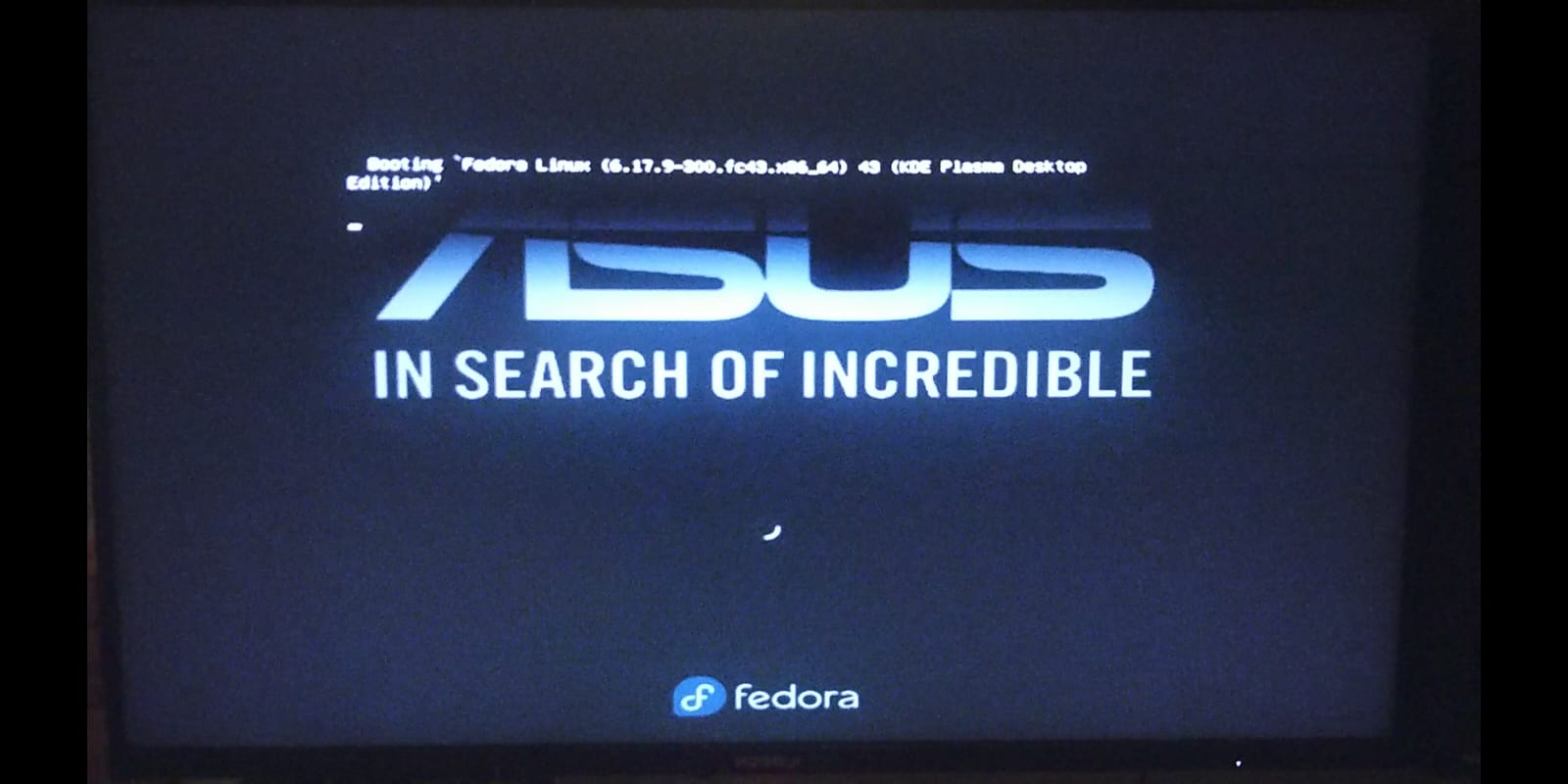
OK, then you don’t get any log files. Would have been nice if you had mentioned the fact that you can’t pass the luks pw prompt!
Have you tried to type in the pw ‘blind’? I suspect the PW prompt is visible on a display connected to the iGPU.
I did:
I’m sorry if that was phrased in a misunderstanding way.
As for trying to input it blind, I did do that for the one where I tried to get the log from using journalctl --no-hostname --no-pager -b -1 -k -g nvrm
The computer is plugged into two monitors, both using DP. So I tried your idea of plugging on into the motherboard to connect it with the iGPU. To my surprise I did get a display on both monitors, and I wasn’t just able to input the LUKS PW but also log into my account and get an output after that. I have no idea why that fixed it, but it did. Even after plugging the monitor that was connected to iGPU back into the GPU, I still got a display. Rebooting in that state unfortunately did introduce the problem again, but switching one monitor to the iGPU did seem to work even after booting. The display connected to the GPU is set to a lower resolution during boot up but reverts to regular resolution after I log into my account.
ah, sorry, somehow I missed that or forgot 
What happens when you add amdgpu to the `rd.driver.blacklist= ?
rd.driver.blacklist=nouveau,nova_core,amdgpu,amdxcp leave modprobe.blacklist as it is
Not sure about amdxcp though. Try both only amdgpu and amdgpu,amdxcp
Otherwise you would need to add the nvidia drivers to the initramfs file.
rd.driver.blacklist=nouveau,nova_core,amdgpu causes the monitor that’s connected to the iGPU to be stuck at the Booting a command list _ screen, while the other works normally.
rd.driver.blacklist=nouveau,nova_core,amdgpu,amdxcp causes the monitor that’s connected to the iGPU to be stuck at the Booting a command list _ screen, while the other freezes during the boot screen with the loading circle in the upper left corner and stops displaying anything if you wait long enough.
rd.driver.blacklist=nouveau,nova_core,amdxcp causes everything to work the same as if there is just rd.driver.blacklist=nouveau,nova_core
too bad. There seems to be an issue with the amdgpu driver. It blocks if no display is connected. Not sure. On my system I do see the LUKS PW prompt even when no display is connected to the Intel iGPU.
I guess the only workaround is to add the nvidia driver to the initramfs.
Create a copy of the current initramfs in /boot or just rename the file. Should be still in /boot so you can still use that to boot the system if needed.
then create a file in /etc/dracut.conf.d/ i.e. add_nvidia.conf (name is up to you, must end with .conf ) and add the line
add_drivers+=" nvidia nvidia-drm nvidia-modeset nvidia-uvm "
The space post and pre the quotation mark are required.
run sudo dracut to regenerate the initramfs for the current kernel.
This should work with both displays connected to the dGPU.
Important: you have to regenerate the initramfs after a nvidia driver update.
You can also omit the nouveau driver from the initramfs. This should de-bloat the initramfs to an acceptable size.
add the line
omit_drivers+=" nouveau "
to the previous file or create a new file in /etc/dracut.conf.d/
1 Like