jgoodier
October 4, 2025, 12:20pm
1
I’m trying to update my system through Discover on KDE. The update fails giving me the following error:
“Internal error:
I’ve looked at these posts: /boot nearly full - how to free space? even though 2 kernals are only insatalled , Kernel 5.7.11 not enough space in /boot
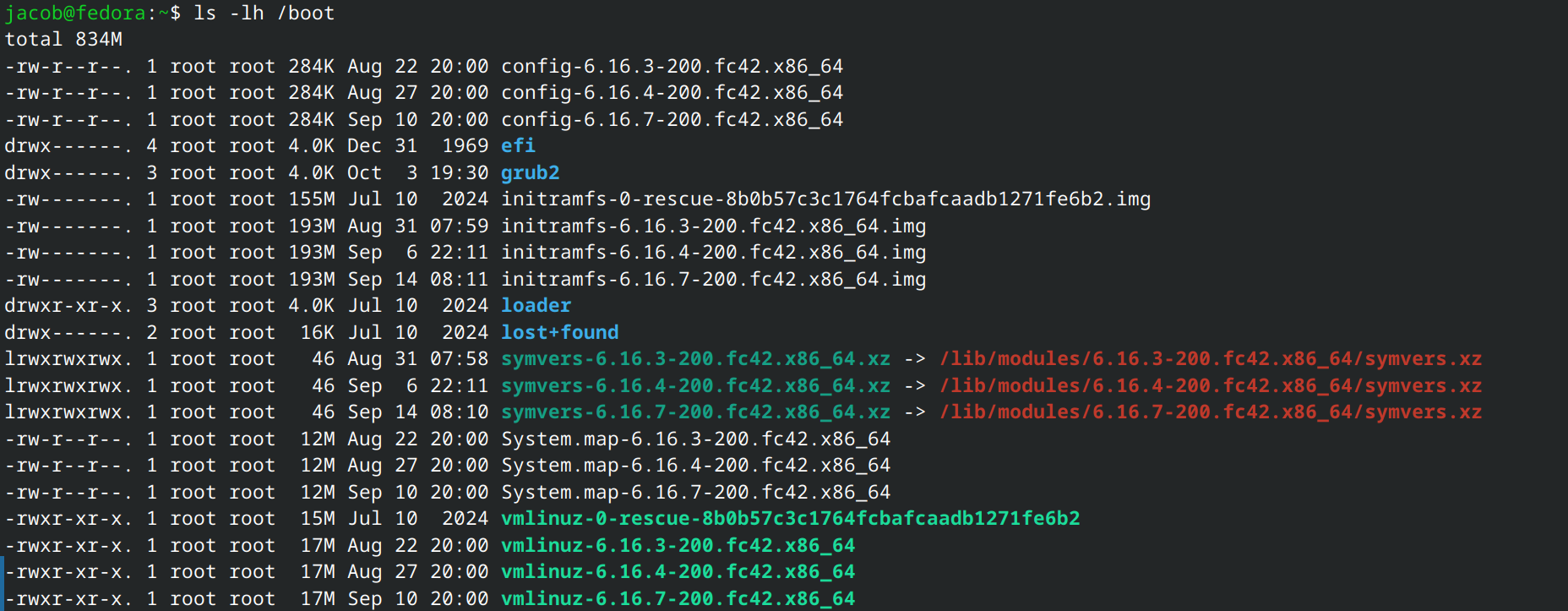
The first one recommended ls -lh /boot which gives:
The second one recommended rpm -q kernel; df -h /boot; lsblk -o +FSTYPE,UUID | grep -e /boot which gives:
I don’t know what either of these are really showing me, so any help diagnosing the issue is greatly appreciated.
It is a known issue, future versions of Fedora will likely install with 2GB boot partitions.
You can safely delete the oldest files in your /boot folder and try again.
Going forward, you may need to do this again, or expand your boot partition to fit new updates.
Also see Boot disk full
With the amount of kernel boot problems over the last six months, I’d go with the expansion if possible.
1 Like
Something happened in the last 8 days. Earlier today, I resized the boot partition to 2GB , regenerated grub config and initramfs and they are all 33MB now. I changed nothing to dracut config.
$ sudo ls -l /boot/ini*
-rw------- 1 root root 175968669  9 mai 12:14 initramfs-0-rescue-c9b852c1fd8c44b8aaa12d3e5c7a3992.img
-rw------- 1 root root  66331174 10 sep 09:21 initramfs-6.12.25-200.fc42.x86_64.img
-rw------- 1 root root  32652782 26 sep 08:11 initramfs-6.12.49-200.fc42.x86_64.img
-rw------- 1 root root  32657689  4 oct 05:45 initramfs-6.12.50-200.fc42.x86_64.img
-rw------- 1 root root  67492388 10 sep 09:23 initramfs-6.15.10-200.fc42.x86_64.img
-rw------- 1 root root  67524653 24 sep 08:26 initramfs-6.16.4-200.fc42.x86_64.img
-rw------- 1 root root  33207807  4 oct 05:45 initramfs-6.16.9-200.fc42.x86_64.img
$ sudo grub2-mkconfig -o /boot/grub2/grub.cfg
Generating grub configuration file ...
Adding boot menu entry for UEFI Firmware Settings ...
done
$ sudo dracut -f --regenerate-all
$ sudo ls -l /boot/initramfs-*
-rw------- 1 root root 175968669  9 mai 12:14 /boot/initramfs-0-rescue-c9b852c1fd8c44b8aaa12d3e5c7a3992.img
-rw------- 1 root root  32653162  5 oct 11:01 /boot/initramfs-6.12.25-200.fc42.x86_64.img
-rw------- 1 root root  32656633  5 oct 11:02 /boot/initramfs-6.12.49-200.fc42.x86_64.img
-rw------- 1 root root  32656147  5 oct 11:02 /boot/initramfs-6.12.50-200.fc42.x86_64.img
-rw------- 1 root root  33226930  5 oct 11:03 /boot/initramfs-6.15.10-200.fc42.x86_64.img
-rw------- 1 root root  33209549  5 oct 11:03 /boot/initramfs-6.16.4-200.fc42.x86_64.img
-rw------- 1 root root  33209873  5 oct 11:03 /boot/initramfs-6.16.9-200.fc42.x86_64.img
my setup:
$ sudo fdisk -l /dev/sda
Disk /dev/sda: 465,76 GiB, 500107862016 bytes, 976773168 sectors
Disk model: CT500MX500SSD1
Units: sectors of 1 * 512 = 512 bytes
Sector size (logical/physical): 512 bytes / 4096 bytes
I/O size (minimum/optimal): 4096 bytes / 4096 bytes
Disklabel type: gpt
Disk identifier: B272B58D-59F9-4FCC-87BD-0C77B098C56C

Device       Start       End   Sectors   Size Type
/dev/sda1     2048      4095      2048     1M BIOS boot
/dev/sda2     4096   4198399   4194304     2G Linux filesystem
/dev/sda3  4198400 976773119 972574720 463,8G Linux filesystem
A little history: They went from 90M to 64M then 33M. Weird!
That is interesting. Tested the commands and confirmed the issue.
$ ll /boot/initramfs-*
-rw------- 1 root root 168M 9 mai 12:14 /boot/initramfs-0-rescue-c9b852c1fd8c44b8aaa12d3e5c7a3992.img
-rw------- 1 root root 89M 7 sep 22:16 /boot/initramfs-6.12.25-200.fc42.x86_64.img
-rw------- 1 root root 89M 7 sep 22:17 /boot/initramfs-6.12.44-200.fc42.x86_64.img
-rw------- 1 root root 95M 7 sep 22:18 /boot/initramfs-6.15.10-200.fc42.x86_64.img
-rw------- 1 root root 96M 7 sep 22:19 /boot/init…
1 Like