I rebooted and selected Linux 6.17.7-300.fc43.x86_64 which works fine.
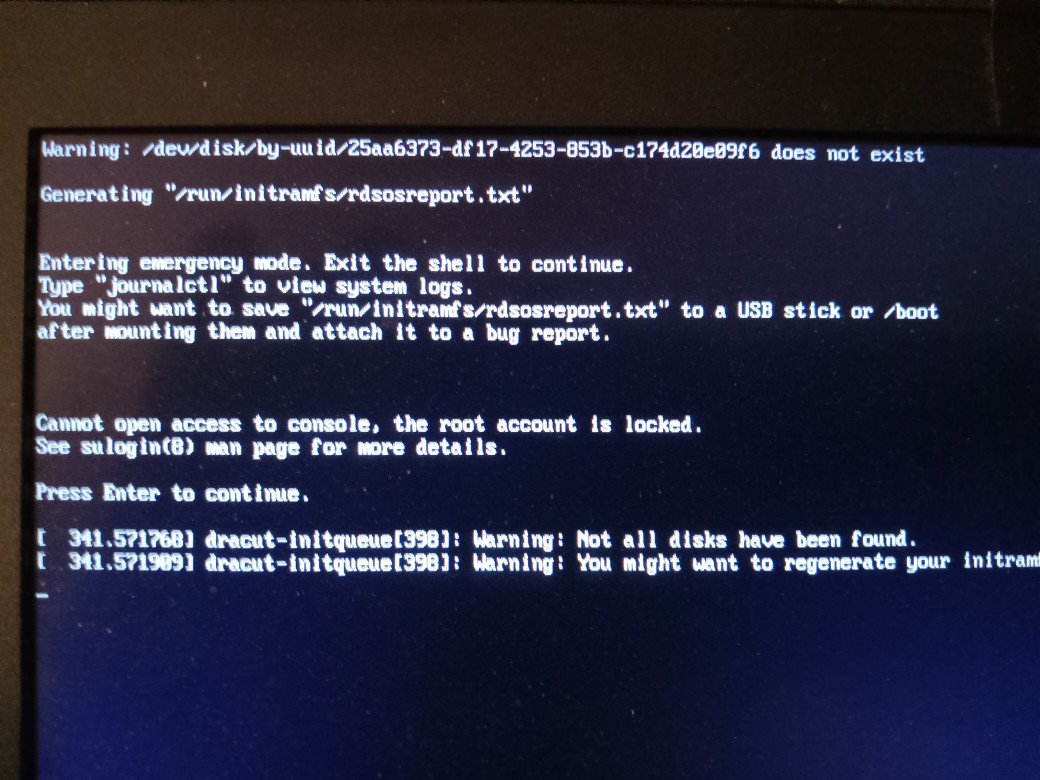
When I booted up Fedora 43 and entered my LUKS full disk encryption password, I see the spinning circle for about a minute and then Fedora goes into a CLI and reports Entering emergency mode:
I then looked for the system log under /run/initramfs/ and there are is no log file and there are some other files but they are empty.
If I then reboot then this issue repeats - I enter LUKS full disk password, get a spinning disk for about a minute, then get the CLI messages as shown above, then reboot and able to select Linux 6.17.7-300.fc43.x86_64 and it works fine.
I am just a home user of Fedora and not an IT person and I do not know what I should do next to resolve this.
That list includes previous installed kernels. The kernel is the part of the Operating Sistem that loads first and allows the rest of the software that follows to access the hardware. Fedora installs a new kernel once in a while as part of the regular upgrades. When a new kernel is installed the oldest one is removed and some of the in-between kernels are kept in case you need to boot with one of those instead of the latest one.
So in short it seems there is something wrong with the last kernel installed.
You need the assistance of somebody who knows more than me about the internals of Fedora but my guess is you could boot the 6.17.7 (if the 6.17.8 is broken) and then try to force the re-install of the latest kernel available.
You might try something like journalctl -b -p err one you get in to see if you can find something in the error logs. Using journactl like this should only bring up errors.
Also it appears like the kernel is possibly not finding one of the disks. i don’t know why. Maybe someone else can chime in on what is going on here and what the fix is. I did find two other threads relating to similar (but not the same issues). My guess is that the solution may be found by running the dracut shell, but I have no experience with that at all. Those other two threads are here…
Note, I am a real hack and just start looking for as much information as I can find when I see things like this. That may give you a clue, but not necessarily a solution. Hopefully someone else with more experience can chime in and point you in the right direction. Of course the way to the solution is to find out exactly why the problem occurred in the first place…
Using journalctl with the -b option will bring up info from the current boot. To go back to previous boots, you can use the -b1 option, etc… man journalctl can give you more info on the command…
I really feel that I am a bit in over my head when it comes to things like this. But it never hurts to do some research and see what turns up. In this case people were having similar but not exactly the same issues as you. And it never hurts to run journalctl to see if it can bring up some relevant info. Sometimes it does and other times it does not. From the info you presented it appears that something is not getting recognized at boot up because of the warning that “not all disks have been found”. I don’t know the solution to that although it may involve the dracut shell, something which I have zero experience with…
For the less technical user, it means to open a terminal and type the above command “ls -al /boot”, press “enter”, then select the output text and paste it here.
This might be related to the issue with the boot partition running out of space because of bigger initramfs with more recent kernels. You can run lsblk -f to check the available size on your boot partition. If the available space is limited, it’s possible that dracut couldn’t generate the initramfs for the lastest kernel.
File sizes of the relevant files for boot and the kernel look fine to me - doesn’t look like dracut has had a failure when build anything, either. Looks like there’s plenty of space available too from subsequent posts.
I note you say there was no issue with firing up the machine for the first boot of the day; which kernel was than, and can you now boot 6.17.7 without any issue - the same kernel that you stated was unusable in your initial post?
I think the previous upgrade was maybe interrupted or something like that and then the last upgrade completed successfully instead, then it installed the latest kernel and it works as expected. Some upgrades require only to install the new version and remove the old one but some other upgrades, like the kernel, require also to re-build configurations across the system to complete.