Computer crashes when sleeping

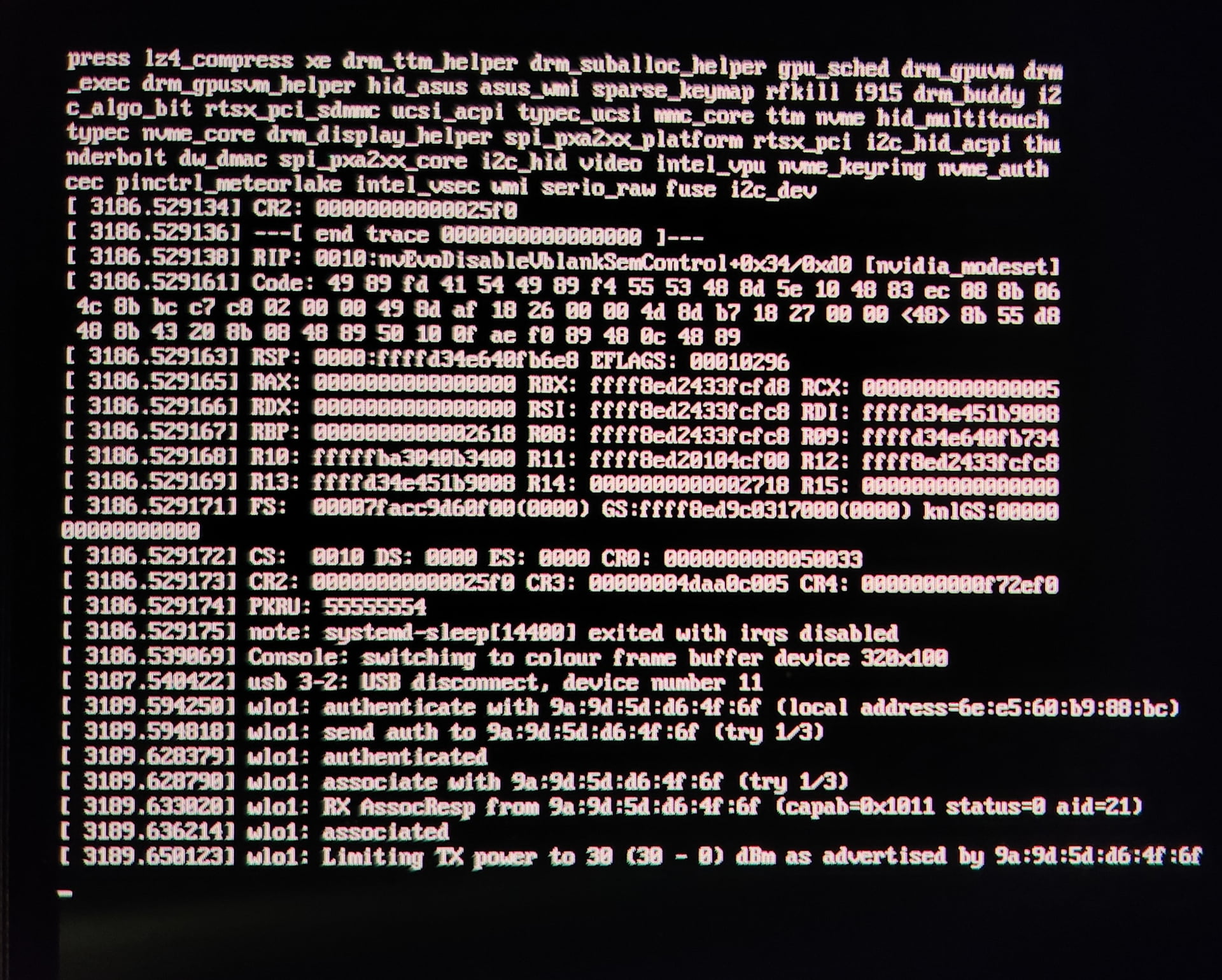
Since an update a week and a half-ish ago my computer has been unable to successfully sleep. Either immediately upon sleeping or when attempting to wake it from sleep I get this screen and have to reboot. Any ideas on how to fix it? Thanks!

press lz4_compress xe drm_ttm_helper drm_suballoc_helper gpu_sched drm_gpuvm drm_exec drm_gpusvm hid_asus asus_wmi sparse_keymap rfkill i915 drm_buddy i2c_algo_bit rtsx_pci_sdmmc ucsi_acpi type_ucsi mmc_core ttm nvme hid_multitouch typec nvme_core drm_display_helper spi_pxa2xx_platform rtsx_pci i2c_hid_acpi thunderbolt dw_dmac spi_pxa2xx_core i2c_hid video intel_vpu nvme_keyring nvme_auth cec pinctrl_meteorlake intel_vsec wmi serio_raw fuse i2c_dev
[ 3186.529134] CR2: 00000000000025f0
[ 3186.529136] --[ end trace 0000000000000000 ]---
[ 3186.529138] RIP: 0010:nvEvoDisableVblankSemControl+0x34/0xd0 [nvidia_modset]
[ 3186.529161] Code: 49 89 fd 41 54 49 89 f4 55 53 48 8d 5e 10 48 83 ec 00 0b 06 4c 8b bc c7 c8 02 00 00 49 8d af 18 26 00 00 4d 8b b7 18 27 00 00 <48> 8b 55 d8 48 8b 43 20 8b 08 48 89 50 10 0f  89 48 0c 48 89
[ 3186.529163] RSP: 000:ffffd34e640fbe8 EFLAGS: 00010296
[ 3186.529165] RAX: 0000000000000000 RBX: ffff8ed2433fcfd8 RCX: 0000000000000005
[ 3186.529166] RDX: 0000000000000000 RSI: ffff8ed2433fcfc8 RDI: ffffd34e451b9008
[ 3186.529167] RBP: 0000000000002618 R08: ffff8ed2433fcfc8 R09: fffffd34c640fb734
[ 3186.529168] R10: fffffba3040b3400 R11: ffff8ed20104cf00 R12: ffff8ed2433fcfc8
[ 3186.529169] R13: ffffd34e451b9008 R14: 0000000000002718 R15: 0000000000000000
[ 3186.529171] FS:  00007facc9d60f00(0000) GS: ffff8ed9c0317000(0000) kn1GS:0000000000000000
[ 3186.529172] CS:  0010 DS: 0000 ES: 0000 CR0: 0000000000050033
[ 3186.529173] CR2: 00000000000025f0 CR3: 00000004daa0c005 CR4: 0000000000f72ef0
[ 3186.529174] PKRU: 55555554
[ 3186.529175] note: systemd-sleep[14400] exited with irqs disabled
[ 3186.539069] Console: switching to colour frame buffer device 328x100
[ 3187.540422] usb 3-2: USB disconnect, device number 11
[ 3189.594250] wlo1: authenticate with 9a:9d:5d:d6:4f:6f (local address=6e:e5:60:b9:88:bc)
[ 3189.594818] wlo1: sent auth to 9a:9d:5d:d6:4f:6f (try 1/3)
[ 3189.628379] wlo1: authenticated
[ 3189.628790] wlo1: associate with 9a:9d:5d:d6:4f:6f (try 1/3)
[ 3189.633020] wlo1: RX AssocResp from 9a:9d:5d:d6:4f:6f (capab=0x1011 status=0 aid=21)
[ 3189.636214] wlo1: associated
[ 3189.659123] wlo1: Limiting TX power to 30 (30 - 0) dBm as advertised by 9a:9d:5d:d6:4f:6f

*sorry for any errors, had to manually input from pic
Operating System: Fedora Linux 44
KDE Plasma Version: 6.7.3
KDE Frameworks Version: 6.28.0
Qt Version: 6.11.1
Kernel Version: 7.1.5-201.fc44.x86_64 (64-bit)
Graphics Platform: Wayland
Processors: 22 × Intel® Core™ Ultra 9 185H
Memory: 32 GiB of RAM (30.7 GiB usable)
Graphics Processor 1: Mesa Intel® Arc
Graphics Processor 2: NVIDIA GeForce RTX 4080 Laptop GPU/PCIe/SSE2
Manufacturer: ASUSTeK COMPUTER INC.
Product Name: ROG Zephyrus G16 GU605MZ_GU605MZ
System Version: 1.0

Potentially (ir)relevant info: I had some trouble initially installing 44 the weeks following its release. Prior to downloading the update there was a discover popup saying it would remove kmod-nvidia packages in order to install other packages but would fail repeatedly after restart&install. I eventually followed I believe this solution to update repos and was able to get everything running. Since then, periodically when I update system packages I will get notices like this one yesterday (I hadnt gotten these in my year using fedora before this fix)

The second image in your post is an information screen. Whenever a new kernel is installed the oldest is removed, along with the kernel modules that are associated. In your instance it is installing kernel 7.1.5-101 and removing kernel 7.1.4-202 which necessitates removal of the associated kmod-nvidia package.

Since it seems the gui software management tools often have issues I never use them (I am on workstation with gnome). Instead I always update using the cli and the dnf command, and perform system version upgrades the same way.
sudo dnf upgrade --refresh for routine upgrades and I follow the instructions here for version upgrades.

The really significant difference between the gui and the command line is that the user gets detailed info about the process when using dnf. The user must also use one additional cli command to update flatpaks flatpak upgrade

I dont know enough to glean anything from the message upon crashing. When I run that command it looks like everything is up to date.

Updating and loading repositories:
 Fedora 44 - x86_64 - Updates                                                                                                                                                                                       100% |   4.6 KiB/s |  25.0 KiB |  00m05s
 RPM Fusion for Fedora 44 - Nonfree - Updates                                                                                                                                                                       100% |   1.1 KiB/s |   5.3 KiB |  00m05s
 RPM Fusion for Fedora 44 - Nonfree - Steam                                                                                                                                                                         100% |   1.3 KiB/s |   5.3 KiB |  00m04s
 RPM Fusion for Fedora 44 - Nonfree - NVIDIA Driver                                                                                                                                                                 100% |   1.5 KiB/s |   5.5 KiB |  00m04s
 RPM Fusion for Fedora 44 - Nonfree                                                                                                                                                                                 100% |   1.8 KiB/s |   5.7 KiB |  00m03s
 RPM Fusion for Fedora 44 - Free - Updates                                                                                                                                                                          100% |   1.0 KiB/s |   2.8 KiB |  00m03s
 RPM Fusion for Fedora 44 - Free                                                                                                                                                                                    100% |   1.3 KiB/s |   3.0 KiB |  00m02s
 google-chrome                                                                                                                                                                                                      100% |   2.0 KiB/s |   1.3 KiB |  00m01s
 Fedora 44 openh264 (From Cisco) - x86_64                                                                                                                                                                           100% | 564.0   B/s | 986.0   B |  00m02s
 Fedora 44 - x86_64                                                                                                                                                                                                 100% |  19.4 KiB/s |  24.5 KiB |  00m01s
 Copr repo for PyCharm owned by phracek                                                                                                                                                                             100% |   3.3 KiB/s |   2.1 KiB |  00m01s
 Copr repo for asus-linux owned by lukenukem                                                                                                                                                                        100% |   2.3 KiB/s |   1.5 KiB |  00m01s
 Adoptium                                                                                                                                                                                                           100% |   4.1 KiB/s |   1.7 KiB |  00m00s
Repositories loaded.
Nothing to do.

Looks like existing bug reports at Nvidia: https://forums.developer.nvidia.com/t/suspend-crash-in-nvevodisablevblanksemcontrol-610-43-03-legion-pro-7i-gen-8-matches-existing-report-377732/378040