I did all this already. I am starting to think the HP doesnt allow the hard drive to be accessed to install linux. Only windows is implemented and then the SSD is locked by the manufacturer which is what i am starting to thing is my problem. Must be a hardware block etc…
Ahh you got windows installed ! Did you shutdown windows before you run usblive ?
If isn’t shutdown properly windows could interfere linux kernel that and if fast boot is set in bios could cause problem
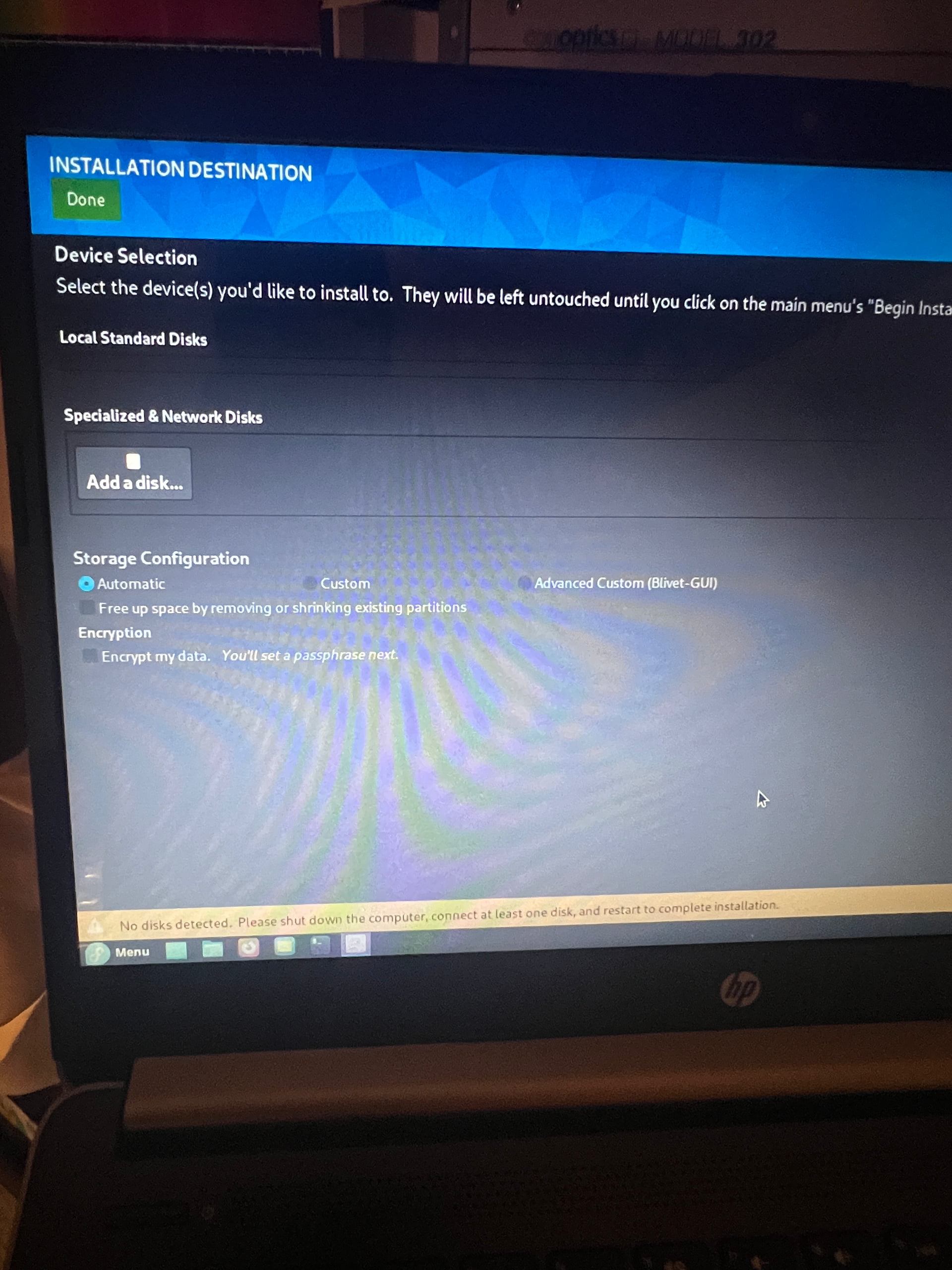
yes I restart through Bios etc. goes live etc. just doesn’t recognize the SSD.
not set up for fast boot that is not activated.
I don’t ask for restart I ask did you go in windows shutdown it boot up liveusb add nvme_load=yes after image start with ctrl + x and check install anaconda like that
step 1 shutdown windows is important
Probably you will need “cold shutdown” of windows and that is done if you
Press shift button and select shutdown from menu
I did a shift button select from menu shutdown. I restart to boot selection as described I added the nvme_load=yes to the fedora etc, still doesnt recognize the SSD,
after i hit cntrl x it says booting up list and then the whole screen goes through operations etc. then it goes to live. I then proceed to load unto harddrive then goes to installation disk and nothing shows up again. no hardrives or SSD drives or anything
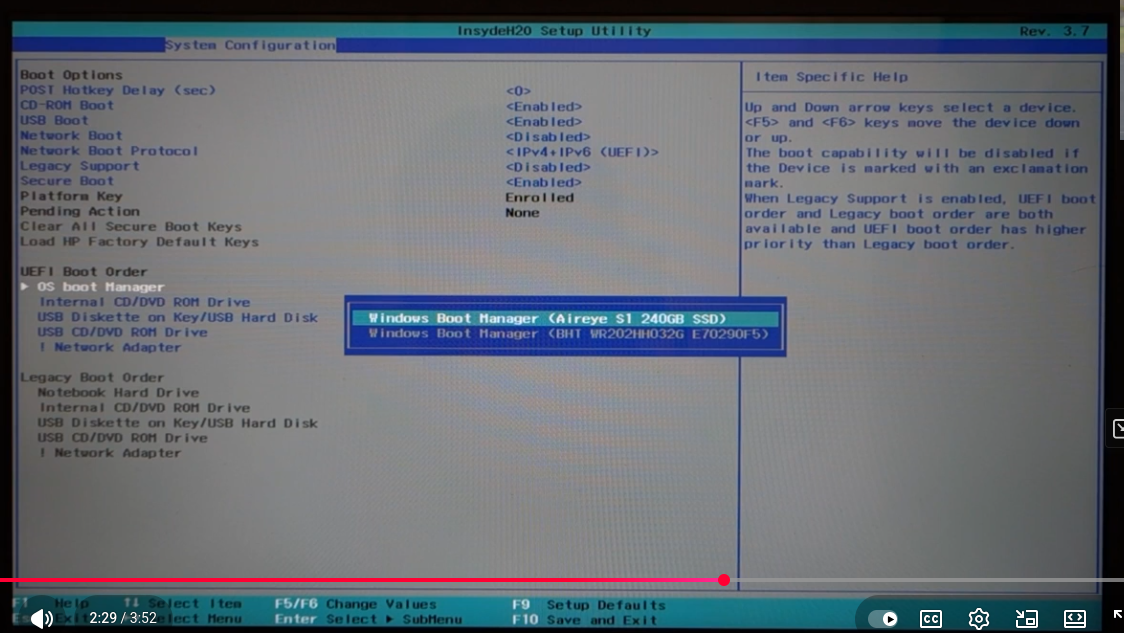
Go to bios configuration – uefi boot order and select windows boot manager for your ssd F10 to save it and check again live usb it will recognize your ssd
Please look on https://linux-hardware.org/ if your hardware is compatible with Linux and what kind of problems others have with the same Hardware. This might help you to find a way how to make your hardware work.
Beside what you wrote I still have some issues to understand the Situation how exactly you run the Linux you have installed? Or the live iso/usb you try to work with?
Please make a probe on the page listed above and give us the link so we can see with what issues you might have to deal.
I never installed Linux on my system because of the SSD hardware recognition issue in BIOS, therefore I cannot probe my system and upload the data to the linuxHardware.org.
I did a little more research on my system and the BIOS issue on what and how to recognize the SSD and this is what I found out:
The HP 14-dq0002dx model features a 64 GB eMMC drive, which is not a standard SSD and is soldered onto the motherboard.
Based on available information, this model does not have a dedicated M.2 SSD slot for an upgrade.
The eMMC drive is not upgradable, and there are no storage upgrade options available for this specific configuration.
While some similar HP 14-dq0xxx models may have had M.2 slots, the 14-dq0002dx does not appear to have one.
Therefore, replacing the eMMC drive with a larger SSD is not feasible on this model.
The BIOS is Locked to boot from the eMMC Drive and of course any attempt to try and recognize SSD is impossible and it appears to be hardware driven not to allow,
I use Lenovo IdeaPads with eMMC drives and they work well. The BIOS is different of course.
You can also run/install Linux on a Micro SD card or a USB.
1 Like
Linux works well on external SSD USB3 drives. Many older systems have internal disk drives that are much slower than SSD USB3 drives, so even disk-intensive processing is faster with SSD USB3 drives. I have a couple USB3 cases that accept NVME cards. They don’t support S.M.A.R.T diagnostics and testing, but I have used one with Fedora for several years on a old iMac just because it is much faster than using the internal drive.
1 Like
Some USB SSD enclosures do support SMART - it depends on the chipset. (Not necessarily a complete list.)
USB thumb drives heat up and then throttle.
They work but not great for heavy loads with lots of read/write.
The NVME in a USB3 enclosure is awesome though!
2 Likes
I am back with a Lenova T490s think jet laptop. I worked the bios and now it starts to load up live fedora as usual . Now it recognizes the ssd harddrive in the installation destination. It shows the 238.47 toshiba drive with nvme0n1 / 2.3 MiB Free. Storage configuration is set for automatic. However does it need to be set to automatic or should it be custom or advanced custom and freeup space by removing or shrinking existing partions? when i click done, it aks if i want ot reclaim disk space and also on the bottom asks to delete all etc? I feel i am almost there for full installation…
I have successfully added Fedora Linux to my new laptop (well new is a relative word) but now I have to reload the software as somehow the password didnt go correctly in as it is asking for this information the setup must have been overlooked by a brilliant guy…
all is well in Fedora land It was successfully installed into the Lenova thinkpad. I hate, let me repeat, hate HP for what they have done by blocking the ability to load and partition the hard drive. I seriously doubt I would ever purchase another HP again as they appear to be in bed with windows…Good bye HP!!!hahaha I am screaming for joy with Lenova!!!
3 Likes