It is still happening after I disabled that swap memory. Might be connection or cable. Will try to troubleshoot that. Thanks.
Actually, most other programs (steam, chrome, sublimetext) are running fine. Chrome has some graphical glitches. The ones crashing are like dnf, spyder, gnome-abrt, SELinux troubleshooter, SELinux Management, firewalld.
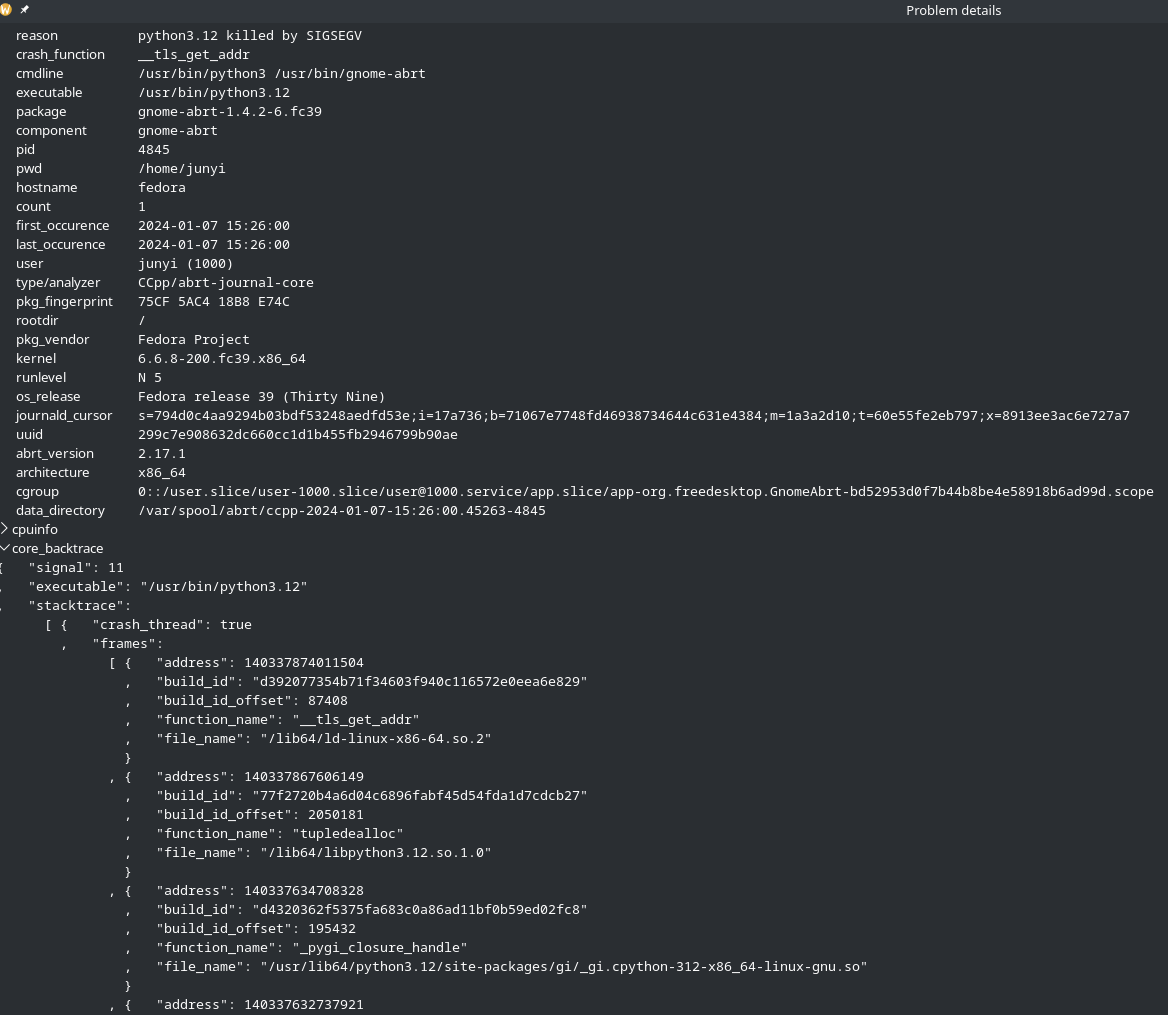
Looking at the stacktrace from abrt, the functions that are crashing are usually __tls_get_addr or current_fast_get(). For example,
for firewalld

gnome-abrt
python
coredumpctl debug 5635
           PID: 5635 (python)
           UID: 1000 (junyi)
           GID: 1000 (junyi)
        Signal: 11 (SEGV)
     Timestamp: Sun 2024-01-07 15:40:32 +08 (59s ago)
  Command Line: python
    Executable: /usr/bin/python3.12
 Control Group: /user.slice/user-1000.slice/user@1000.service/app.slice/app-org.kde.konsole-632167fe94a9423fa6b2b9ce4578b7dc.scope
          Unit: user@1000.service
     User Unit: app-org.kde.konsole-632167fe94a9423fa6b2b9ce4578b7dc.scope
         Slice: user-1000.slice
     Owner UID: 1000 (junyi)
       Boot ID: 71067e7748fd46938734644c631e4384
    Machine ID: 03602e61a9df4544ae4e5504330aabf2
      Hostname: fedora
       Storage: /var/lib/systemd/coredump/core.python.1000.71067e7748fd46938734644c631e4384.5635.1704613232000000.zst (present)
  Size on Disk: 678.5K
       Package: python3.12/3.12.1-2.fc39
      build-id: b30b4b34c148c6ea3a4acb68b33c823a52e3417a
       Message: Process 5635 (python) of user 1000 dumped core.

                Module libpython3.12.so.1.0 from rpm python3.12-3.12.1-2.fc39.x86_64
                Module python3.12 from rpm python3.12-3.12.1-2.fc39.x86_64
                Stack trace of thread 5635:
                #0  0x00007f6aee13b570 __tls_get_addr (ld-linux-x86-64.so.2 + 0x15570)
                #1  0x00007f6aedbf4885 current_fast_get (libpython3.12.so.1.0 + 0x1f4885)
                #2  0x00007f6aedc0ce4f _Py_Dealloc (libpython3.12.so.1.0 + 0x20ce4f)
                #3  0x00007f6aedc0c324 clear_thread_frame (libpython3.12.so.1.0 + 0x20c324)
                #4  0x00007f6aedb19609 _PyEval_EvalFrameDefault (libpython3.12.so.1.0 + 0x119609)
                #5  0x00007f6aedc12cdb _PyObject_VectorcallTstate (libpython3.12.so.1.0 + 0x212cdb)
                #6  0x00007f6aedc34eca PyObject_CallMethodObjArgs (libpython3.12.so.1.0 + 0x234eca)
                #7  0x00007f6aedc347d2 import_find_and_load (libpython3.12.so.1.0 + 0x2347d2)
                #8  0x00007f6aedb157b7 import_name (libpython3.12.so.1.0 + 0x1157b7)
                #9  0x00007f6aedc8b196 PyEval_EvalCode (libpython3.12.so.1.0 + 0x28b196)
                #10 0x00007f6aedcadd5a run_eval_code_obj (libpython3.12.so.1.0 + 0x2add5a)
                #11 0x00007f6aedca8cce run_mod (libpython3.12.so.1.0 + 0x2a8cce)
                #12 0x00007f6aedc9af86 PyRun_StringFlags (libpython3.12.so.1.0 + 0x29af86)
                #13 0x00007f6aedca6296 builtin_exec_impl (libpython3.12.so.1.0 + 0x2a6296)
                #14 0x00007f6aedb10bfa _PyEval_EvalFrameDefault (libpython3.12.so.1.0 + 0x110bfa)
                #15 0x00007f6aedc8b196 PyEval_EvalCode (libpython3.12.so.1.0 + 0x28b196)
                #16 0x00007f6aedca61dc builtin_exec_impl (libpython3.12.so.1.0 + 0x2a61dc)
                #17 0x00007f6aedb10bfa _PyEval_EvalFrameDefault (libpython3.12.so.1.0 + 0x110bfa)
                #18 0x00007f6aedc12cdb _PyObject_VectorcallTstate (libpython3.12.so.1.0 + 0x212cdb)
                #19 0x00007f6aedc34eca PyObject_CallMethodObjArgs (libpython3.12.so.1.0 + 0x234eca)
                #20 0x00007f6aedc347d2 import_find_and_load (libpython3.12.so.1.0 + 0x2347d2)
                #21 0x00007f6aedc4054e builtin___import___impl (libpython3.12.so.1.0 + 0x24054e)
                #22 0x00007f6aedc0b08c cfunction_vectorcall_FASTCALL_KEYWORDS (libpython3.12.so.1.0 + 0x20b08c)
                #23 0x00007f6aedbf312a _PyObject_VectorcallTstate (libpython3.12.so.1.0 + 0x1f312a)
                #24 0x00007f6aedbf3052 PyObject_CallFunction (libpython3.12.so.1.0 + 0x1f3052)
                #25 0x00007f6aedc40290 PyImport_Import (libpython3.12.so.1.0 + 0x240290)
                #26 0x00007f6aedcab9c0 PyImport_ImportModule (libpython3.12.so.1.0 + 0x2ab9c0)
                #27 0x00007f6aedc98f70 init_import_site (libpython3.12.so.1.0 + 0x298f70)
                #28 0x00007f6aedc986d4 pyinit_main (libpython3.12.so.1.0 + 0x2986d4)
                #29 0x00007f6aedc765dd Py_InitializeFromConfig (libpython3.12.so.1.0 + 0x2765dd)
                #30 0x00007f6aedc76071 pymain_init (libpython3.12.so.1.0 + 0x276071)
                #31 0x00007f6aedc75334 pymain_main (libpython3.12.so.1.0 + 0x275334)
                #32 0x00007f6aedc74f5c Py_BytesMain (libpython3.12.so.1.0 + 0x274f5c)
                #33 0x00007f6aed84614a __libc_start_call_main (libc.so.6 + 0x2814a)
                #34 0x00007f6aed84620b __libc_start_main_impl (libc.so.6 + 0x2820b)
                #35 0x000056019d761095 _start (python3.12 + 0x1095)
                ELF object binary architecture: AMD x86-64
This was partly why I thought it was a python problem initially, but I am not ruling out any other potential causes.
I tried running python codes in podman with the python official container and that seems fine but I don’t think I run it enough for it to tell if it is causing segmentation faults.
Thanks.
If it is random – sometimes it fails but sometimes it works – it would almost have to be a hardware problem. The behavior of the software is usually quite consistent. Software problems are usually all or nothing – the code either works, or it does not. (There can, however, be exceptions triggered by “external” conditions such as network connectivity.)
Do you have the skills to find the reason for the SEGV from the core dump with gdb?
Just to check have you overclocked the CPU?
Check that you have the current versions of python3-lib and openssl. Here (updated yesterday):
% dnf list installed | grep openssl
apr-util-openssl.x86_64                              1.6.3-4.fc39                        @anaconda
openssl.x86_64                                       1:3.1.1-4.fc39                      @fedora
openssl-devel.x86_64                                 1:3.1.1-4.fc39                      @fedora
openssl-libs.x86_64                                  1:3.1.1-4.fc39                      @anaconda
openssl-pkcs11.x86_64                                0.4.12-4.fc39                       @anaconda
xmlsec1-openssl.x86_64                               1:1.2.37-5.fc39                     @anaconda

% dnf whatprovides  /usr/lib64/python3.12/ssl.py
Last metadata expiration check: 0:03:19 ago on Sun 07 Jan 2024 07:53:48 AM.
python3-libs-3.12.0-1.fc39.x86_64 : Python runtime libraries
Repo        : fedora
Matched from:
Filename    : /usr/lib64/python3.12/ssl.py

python3-libs-3.12.1-2.fc39.x86_64 : Python runtime libraries
Repo        : @System
Matched from:
Filename    : /usr/lib64/python3.12/ssl.py

python3-libs-3.12.1-2.fc39.x86_64 : Python runtime libraries
Repo        : updates
Matched from:
Filename    : /usr/lib64/python3.12/ssl.py
Assuming you are using the current versions (not causing problems for most of us), it should be possible to construct a minimal test python script which will allow you determine whether the issue is reproducible. See Python.org ssl library for examples.
Edit: check the libraries used py python import ssl:
% LD_DEBUG=libs  python
     86391:     find library=libpython3.12.so.1.0 [0]; searching
     86391:      search cache=/etc/ld.so.cache
     86391:       trying file=/lib64/libpython3.12.so.1.0
     86391:
     86391:     find library=libc.so.6 [0]; searching
     86391:      search cache=/etc/ld.so.cache
     86391:       trying file=/lib64/libc.so.6
     86391:
     86391:     find library=libm.so.6 [0]; searching
     86391:      search cache=/etc/ld.so.cache
     86391:       trying file=/lib64/libm.so.6
     86391:
     86391:
     86391:     calling init: /lib64/ld-linux-x86-64.so.2
     86391:
     86391:
     86391:     calling init: /lib64/libc.so.6
     86391:
     86391:
     86391:     calling init: /lib64/libm.so.6
     86391:
     86391:
     86391:     calling init: /lib64/libpython3.12.so.1.0
     86391:
     86391:
     86391:     initialize program: python
     86391:
     86391:
     86391:     transferring control: python
     86391:
     86391:     find library=libreadline.so.8 [0]; searching
     86391:      search cache=/etc/ld.so.cache
     86391:       trying file=/lib64/libreadline.so.8
     86391:
     86391:     find library=libtinfo.so.6 [0]; searching
     86391:      search cache=/etc/ld.so.cache
     86391:       trying file=/lib64/libtinfo.so.6
     86391:
     86391:
     86391:     calling init: /lib64/libtinfo.so.6
     86391:
     86391:
     86391:     calling init: /lib64/libreadline.so.8
     86391:
     86391:
     86391:     calling init: /usr/lib64/python3.12/lib-dynload/readline.cpython-312-x86_64-linux-gnu.so
     86391:
     86391:
     86391:     calling init: /usr/lib64/python3.12/lib-dynload/_opcode.cpython-312-x86_64-linux-gnu.so
     86391:
Python 3.12.1 (main, Dec 18 2023, 00:00:00) [GCC 13.2.1 20231205 (Red Hat 13.2.1-6)] on linux
Type "help", "copyright", "credits" or "license" for more information.
>>> import ssl
     86391:     find library=libssl.so.3 [0]; searching
     86391:      search cache=/etc/ld.so.cache
     86391:       trying file=/lib64/libssl.so.3
     86391:
     86391:     find library=libcrypto.so.3 [0]; searching
     86391:      search cache=/etc/ld.so.cache
     86391:       trying file=/lib64/libcrypto.so.3
     86391:
     86391:     find library=libz.so.1 [0]; searching
     86391:      search cache=/etc/ld.so.cache
     86391:       trying file=/lib64/libz.so.1
     86391:
     86391:
     86391:     calling init: /lib64/libz.so.1
     86391:
     86391:
     86391:     calling init: /lib64/libcrypto.so.3
     86391:
     86391:
     86391:     calling init: /lib64/libssl.so.3
     86391:
     86391:
     86391:     calling init: /usr/lib64/python3.12/lib-dynload/_ssl.cpython-312-x86_64-linux-gnu.so
     86391:
     86391:
     86391:     calling init: /usr/lib64/python3.12/lib-dynload/_socket.cpython-312-x86_64-linux-gnu.so
     86391:
     86391:
     86391:     calling init: /usr/lib64/python3.12/lib-dynload/math.cpython-312-x86_64-linux-gnu.so
     86391:
     86391:
     86391:     calling init: /usr/lib64/python3.12/lib-dynload/select.cpython-312-x86_64-linux-gnu.so
     86391:
     86391:
     86391:     calling init: /usr/lib64/python3.12/lib-dynload/array.cpython-312-x86_64-linux-gnu.so
     86391:
     86391:
     86391:     calling init: /usr/lib64/python3.12/lib-dynload/_struct.cpython-312-x86_64-linux-gnu.so
     86391:
     86391:
     86391:     calling init: /usr/lib64/python3.12/lib-dynload/binascii.cpython-312-x86_64-linux-gnu.so
     86391:
>>>
1 Like
Hi. Unfortunately, I don’t. 
dnf list installed | grep openssl gives nothing.
[junyi@fedora ~]$ dnf list installed | grep openssl
[junyi@fedora ~]$ dnf whatprovides  /usr/lib64/python3.12/ssl.py
Last metadata expiration check: 4 days, 0:44:25 ago on Thu 04 Jan 2024 07:55:21 PM +08.
python3-libs-3.12.0-1.fc39.x86_64 : Python runtime libraries
Repo        : fedora
Matched from:
Filename    : /usr/lib64/python3.12/ssl.py

python3-libs-3.12.1-2.fc39.x86_64 : Python runtime libraries
Repo        : @System
Matched from:
Filename    : /usr/lib64/python3.12/ssl.py

python3-libs-3.12.1-2.fc39.x86_64 : Python runtime libraries
Repo        : updates
Matched from:
Filename    : /usr/lib64/python3.12/ssl.py
The packages seems to be the latest. The rest seems to be the same except for the line numbers.
[junyi@fedora ~]$ LD_DEBUG=libs  python
      4139:     find library=libpython3.12.so.1.0 [0]; searching
      4139:      search cache=/etc/ld.so.cache
      4139:       trying file=/lib64/libpython3.12.so.1.0
      4139:
      4139:     find library=libc.so.6 [0]; searching
      4139:      search cache=/etc/ld.so.cache
      4139:       trying file=/lib64/libc.so.6
      4139:
      4139:     find library=libm.so.6 [0]; searching
      4139:      search cache=/etc/ld.so.cache
      4139:       trying file=/lib64/libm.so.6
      4139:
      4139:
      4139:     calling init: /lib64/ld-linux-x86-64.so.2
      4139:
      4139:
      4139:     calling init: /lib64/libc.so.6
      4139:
      4139:
      4139:     calling init: /lib64/libm.so.6
      4139:
      4139:
      4139:     calling init: /lib64/libpython3.12.so.1.0
      4139:
      4139:
      4139:     initialize program: python
      4139:
      4139:
      4139:     transferring control: python
      4139:
      4139:     find library=libreadline.so.8 [0]; searching
      4139:      search cache=/etc/ld.so.cache
      4139:       trying file=/lib64/libreadline.so.8
      4139:
      4139:     find library=libtinfo.so.6 [0]; searching
      4139:      search cache=/etc/ld.so.cache
      4139:       trying file=/lib64/libtinfo.so.6
      4139:
      4139:
      4139:     calling init: /lib64/libtinfo.so.6
      4139:
      4139:
      4139:     calling init: /lib64/libreadline.so.8
      4139:
      4139:
      4139:     calling init: /usr/lib64/python3.12/lib-dynload/readline.cpython-312-x86_64-linux-gnu.so
      4139:
      4139:
      4139:     calling init: /usr/lib64/python3.12/lib-dynload/_opcode.cpython-312-x86_64-linux-gnu.so
      4139:
Python 3.12.1 (main, Dec 18 2023, 00:00:00) [GCC 13.2.1 20231205 (Red Hat 13.2.1-6)] on linux
Type "help", "copyright", "credits" or "license" for more information.
>>> import ssl
      4139:     find library=libssl.so.3 [0]; searching
      4139:      search cache=/etc/ld.so.cache
      4139:       trying file=/lib64/libssl.so.3
      4139:
      4139:     find library=libcrypto.so.3 [0]; searching
      4139:      search cache=/etc/ld.so.cache
      4139:       trying file=/lib64/libcrypto.so.3
      4139:
      4139:     find library=libz.so.1 [0]; searching
      4139:      search cache=/etc/ld.so.cache
      4139:       trying file=/lib64/libz.so.1
      4139:
      4139:
      4139:     calling init: /lib64/libz.so.1
      4139:
      4139:
      4139:     calling init: /lib64/libcrypto.so.3
      4139:
      4139:
      4139:     calling init: /lib64/libssl.so.3
      4139:
      4139:
      4139:     calling init: /usr/lib64/python3.12/lib-dynload/_ssl.cpython-312-x86_64-linux-gnu.so
      4139:
      4139:
      4139:     calling init: /usr/lib64/python3.12/lib-dynload/_socket.cpython-312-x86_64-linux-gnu.so
      4139:
      4139:
      4139:     calling init: /usr/lib64/python3.12/lib-dynload/math.cpython-312-x86_64-linux-gnu.so
      4139:
      4139:
      4139:     calling init: /usr/lib64/python3.12/lib-dynload/select.cpython-312-x86_64-linux-gnu.so
      4139:
      4139:
      4139:     calling init: /usr/lib64/python3.12/lib-dynload/array.cpython-312-x86_64-linux-gnu.so
      4139:
      4139:
      4139:     calling init: /usr/lib64/python3.12/lib-dynload/_struct.cpython-312-x86_64-linux-gnu.so
      4139:
      4139:
      4139:     calling init: /usr/lib64/python3.12/lib-dynload/binascii.cpython-312-x86_64-linux-gnu.so
      4139:
That is very odd. You need openssl to have python do TLS.
I for example see this on one of my Fedora arm VM:
$ dnf list installed '*openssl*'
Installed Packages
apr-util-openssl.aarch64                                    1.6.3-4.fc39                                       @fedora
openssl-libs.aarch64                                        1:3.1.1-4.fc39                                     @anaconda
openssl-pkcs11.aarch64                                      0.4.12-4.fc39                                      @anaconda
xmlsec1-openssl.aarch64                                     1:1.2.37-5.fc39                                    @anaconda
Why you do not have openssl is a mystery and almost certainly why you have a problem.
You at least need openssl-libs installed.
When I try to remove openssl-libs I see that dnf refuses to do that.
$ dnf remove openssl-libs.aarch64
Error:
 Problem: The operation would result in removing the following protected packages: sudo
(try to add '--skip-broken' to skip uninstallable packages)
Very odd that openssl-libs is not installed…
1 Like
So you appear to have some libssl.so.3, but not the Fedora 39 version. Here:
~%
[gnw3@cerberusf39]~% ls -l /lib64/libssl.so*
lrwxrwxrwx. 1 root root     15 Aug 30 21:00 /lib64/libssl.so -> libssl.so.3.1.1
lrwxrwxrwx. 1 root root     15 Aug 30 21:00 /lib64/libssl.so.3 -> libssl.so.3.1.1
-rwxr-xr-x. 1 root root 676208 Aug 30 21:00 /lib64/libssl.so.3.1.1
While trying to build sage-10.2 I encountered attempts to load libssl.so.3.1. I wonder if some Python package messed with libssl. I’m not sure why Fedora missed libssl.so.3.1, and there are many lib*.so.?.? packages.
Hi. Actually, I found out why that gives nothing. Cause dnf had a segmentation fault.
Running it again gives
dnf list installed | grep openssl
apr-util-openssl.x86_64                              1.6.3-4.fc39                        @fedora
openssl.x86_64                                       1:3.1.1-4.fc39                      @fedora
openssl-devel.x86_64                                 1:3.1.1-4.fc39                      @fedora
openssl-libs.i686                                    1:3.1.1-4.fc39                      @fedora
openssl-libs.x86_64                                  1:3.1.1-4.fc39                      @fedora
openssl-pkcs11.i686                                  0.4.12-4.fc39                       @fedora
openssl-pkcs11.x86_64                                0.4.12-4.fc39                       @fedora
xmlsec1-openssl.x86_64                               1:1.2.37-5.fc39                     @fedora
However, I think the __tls_get_addr call is referring to thread local storage and not tls in SSL?
Not sure about this.
Actually mine looks the same
[junyi@fedora ~]$ ls -l /lib64/libssl.so*
lrwxrwxrwx. 1 root root     15 Aug 31 08:00 /lib64/libssl.so -> libssl.so.3.1.1
lrwxrwxrwx. 1 root root     15 Aug 31 08:00 /lib64/libssl.so.3 -> libssl.so.3.1.1
-rwxr-xr-x. 1 root root 676208 Aug 31 08:00 /lib64/libssl.so.3.1.1
I do have sage install though.
If dnf is crashing, that might have left your system in some intermediate and unstable state. You might want to boot from a LiveCD, mount your root partition somewhere and then run a command like dnf --installroot=<mountpoint> distro-sync to make sure all the dependencies are installed.
Hi. I tried this and it just says dependencies resolved.
However, I noticed that the python and dnf in the live boot appears to be stable and decided to reinstall Fedora 39.
After that, it seems python seems to work and dnf is okay. However, after installing the virtualization group the segfault comes back.
It might be that I didn’t run python frequently enough after the reinstall or it is virtualization group that has issues. Rolling back does not solve the issue.
So, I think it is either a hardware problem (ssd) , nvidia driver or virtualization group issue. I might try reinstall again and try without installing the virtualization group package over the weekend to see if it is that which is causing problems.
Can you provide the exact command used for that. Maybe others can test if we know how you did this that appears to have caused the problem.
It also would help to know the exact app or apps running when the segfault occurs.
It also helps to show details about the suspected causes. For example, if you believe it may be the nvidia driver then please show the output of dnf list installed \*nvidia\*, lsmod | grep nvidia. For further assurance it may be worth possibly doing the nvidia driver repair steps sudo dnf remove kmod-nvidia-$(uname -r) followed with sudo akmods --force then a reboot.
Hi. The exact command is as follows.
sudo dnf group install --with-optional virtualization
The other outputs are as follows.
junyi@fedora:~$ dnf list installed \*nvidia\*
Installed Packages
akmod-nvidia.x86_64                                                         3:545.29.06-2.fc39                                    @rpmfusion-nonfree-updates
kmod-nvidia-6.6.9-200.fc39.x86_64.x86_64                                    3:545.29.06-2.fc39                                    @@commandline
nvidia-gpu-firmware.noarch                                                  20231211-1.fc39                                       @updates
nvidia-modprobe.x86_64                                                      3:545.29.06-1.fc39                                    @rpmfusion-nonfree-updates
nvidia-persistenced.x86_64                                                  3:545.29.06-1.fc39                                    @rpmfusion-nonfree-updates
nvidia-settings.x86_64                                                      3:545.29.06-1.fc39                                    @rpmfusion-nonfree-updates
xorg-x11-drv-nvidia.x86_64                                                  3:545.29.06-2.fc39                                    @rpmfusion-nonfree-updates
xorg-x11-drv-nvidia-cuda.x86_64                                             3:545.29.06-2.fc39                                    @rpmfusion-nonfree-updates
xorg-x11-drv-nvidia-cuda-libs.x86_64                                        3:545.29.06-2.fc39                                    @rpmfusion-nonfree-updates
xorg-x11-drv-nvidia-kmodsrc.x86_64                                          3:545.29.06-2.fc39                                    @rpmfusion-nonfree-updates
xorg-x11-drv-nvidia-libs.x86_64                                             3:545.29.06-2.fc39                                    @rpmfusion-nonfree-updates
xorg-x11-drv-nvidia-power.x86_64                                            3:545.29.06-2.fc39                                    @rpmfusion-nonfree-updates
junyi@fedora:~$ lsmod | grep nvidia
nvidia_drm            118784  89
nvidia_modeset       1585152  32 nvidia_drm
nvidia_uvm           3522560  0
nvidia              62394368  1061 nvidia_uvm,nvidia_modeset
video                  77824  2 asus_wmi,nvidia_modeset
This is the dnf history output and the problem seem to appear after 14.
ID     | Command line                                                                                          | Date and time    | Action(s)      | Altered
------------------------------------------------------------------------------------------------------------------------------------------------------------
    20 | upgrade                                                                                               | 2024-01-10 21:20 | I, U           |    3
    19 | install podman                                                                                        | 2024-01-10 21:17 | Install        |   39
    18 | group install --with-optional virtualization                                                          | 2024-01-10 21:16 | Install        |   15  <
    17 | group install --with-optional virtualization                                                          | 2024-01-10 21:16 | Install        |  176 >#
    16 | history rollback 12                                                                                   | 2024-01-10 21:12 | Removed        |   42
    15 | history rollback 13                                                                                   | 2024-01-10 21:11 | Removed        |  173 EE
    14 | group install --with-optional virtualization                                                          | 2024-01-10 21:03 | Install        |  173 EE
    13 | install podman                                                                                        | 2024-01-10 20:59 | Install        |   42
    12 | install ./nautilus-dropbox-2023.09.06-1.fedora.x86_64.rpm                                             | 2024-01-10 20:57 | Install        |   12 EE
    11 | install tmux onedrive                                                                                 | 2024-01-10 20:56 | Install        |    2
    10 | install xorg-x11-drv-nvidia-cuda                                                                      | 2024-01-10 20:55 | Install        |    3
     9 | -y install --nogpgcheck --disablerepo=* /tmp/akmods.r2nNs7Cw/results/kmod-nvidia-6.6.9-200.fc39.x86_6 | 2024-01-10 20:52 | Install        |    1
     8 | install akmod-nvidia                                                                                  | 2024-01-10 20:49 | Install        |   75 E<
     7 | install vim                                                                                           | 2024-01-10 20:38 | Install        |    5 >
     6 | reinstall *ssl*                                                                                       | 2024-01-10 20:37 | R              |    8
     5 | reinstall firewalld                                                                                   | 2024-01-10 20:36 | R              |    2
     4 | upgrade                                                                                               | 2024-01-10 20:30 | I, U           |  850 E<
     3 | install https://download1.rpmfusion.org/nonfree/fedora/rpmfusion-nonfree-release-39.noarch.rpm        | 2024-01-10 20:25 | Install        |    1 >
     2 | install https://download1.rpmfusion.org/free/fedora/rpmfusion-free-release-39.noarch.rpm              | 2024-01-10 20:25 | Install        |    1
     1 |                                                                                                       | 2023-11-01 09:04 | Install        | 2049 EE
Thanks.
The list of programs that have problems includes many that use network I/O.
It is common to use threads with SSL. It would be helpful to have a minimal non-working example program for testing.
“sage” the OpenGL extensions library or “sage” the symbolic maths system that is written in python?
[quote=“junyi88, post:33, topic:100730”]
What happens if you just remove the virtualization package (including the optional packages)? If that works try installing the virtualization package without the optional packages, then install the optional packages 1-by-1 to see if the problem is associated with one of those packages.
2 Likes
Sage-math, actually, but it was gone when I upgraded to Fedora 39; FreeCad is also gone.
Removing the virtualization group install doesn’t resolve the problem, but I followed your idea and slowly removed/downgraded packages bit by bit and actually managed to resolve the issue.
So, after downgrading python3 and python3-libs from 3.12.1 to 3.12.0. There no longer is any segmentation faults. Reinstalling the other packages works without issues.
It appears to be a Python issue, specifically with 3.12.1. I had a bug report with this previously, so it is reported for now.
Thank you to everyone for the help and suggestions.
1 Like
freeCAD is available from flathub for F39. The rpm version disappeared though since F39 updated python to 3.12 and FreeCAD does not work with the newer python.
Glad things are working.
I wonder if the problem stems from s remnants of your previous Fedora version. I did a fresh install of 39.
Sage-math depends on some packages that have not been updated for Python 3.12, so I tried building sage[-math]-10.2 from source using an environment with Python 3.11.5 (now upgraded to 3.11.7). Many of the build issues were packages trying to link against libopenssl-3.1. The build process provided .../sage-10.2/local/lib/libssl.so as a symlink to libssl.so.3, which is version 3.0.0, but Fedora has /lib64/libssl.so.3 that is a symlink to version 3.1.1.
(sage) [X@X]~/Projects/sage/sage-10.2% ./sage
┌────────────────────────────────────────────────────────────────────┐
│ SageMath version 10.2, Release Date: 2023-12-03                    │
│ Using Python 3.11.1. Type "help()" for help.                       │
└────────────────────────────────────────────────────────────────────┘
sage:  factor(2005)
5 * 401
sage:
1 Like
Ya. I am using the flatpak version right now.