How to install WiFi usb driver Realtek RTL8188EUS without internet connection?

Hi, I am very new to Fedora, just installed it yesterday.

I’m having problems installing the driver for my wifi wireless usb Realtek RTL8188EUS.

I can’t connect to the internet with cable because my desk computer is on the second floor and very far from the router.

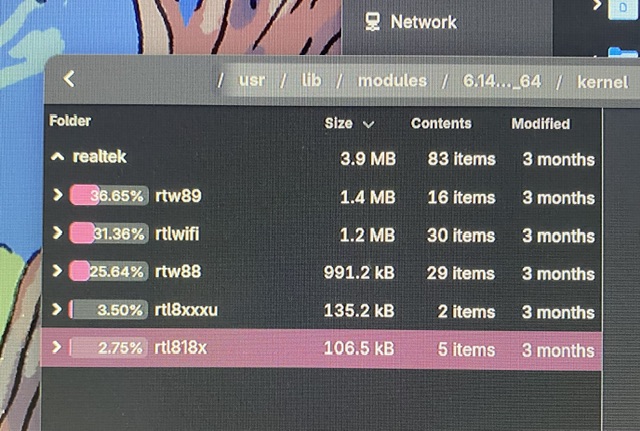
When I check the built-in modules, there are some similar (here are screenshots of those) but I don’t see the particular one I need.


I do have dual boot and Windows 10 on the same computer with working internet, but it did not help me a lot because the Github repos for the said driver I cloned on the Windows do not work on the Fedora (or perhaps I don’t know what do do with them). I tried USB tethering by connecting the computer to my phone, but also seems impossible before installing other packages so I’m currently in the no-internet-loop paradox.

Can I install the needed driver without connecting to the internet while in Fedora or do I need another USB wireless device?

Please help!

P.S. Sorry for the photos but I couldn’t screenshot the screen because too much trouble sending the images to my phone!

I am wondering if you need to install a driver additionally to what is contained in the kernel. Not usual today.

I read that an arch user linked RTL8188EUS to the driver of 8188eu, which worked for them (see here). That should be part of our kernel: drivers/net/wireless/realtek/rtl8xxxu/8188e.c · os-build · cki-project / kernel-ark · GitLab

I would consider to check out if the driver might be there and this is a case to troubleshoot the wifi for not working as intended. Just to add the consideration… Can you maybe add some logs or so? To see if some error is logged, and if the adapter is mentioned on boot, maybe the journal of a short boot. I presume your network manager simply says there is no wifi adapter?
Maybe you can boot and get us the following outputs:
sudo journalctl -r --boot=0 --no-hostname (feel free to further anonymize if you want).
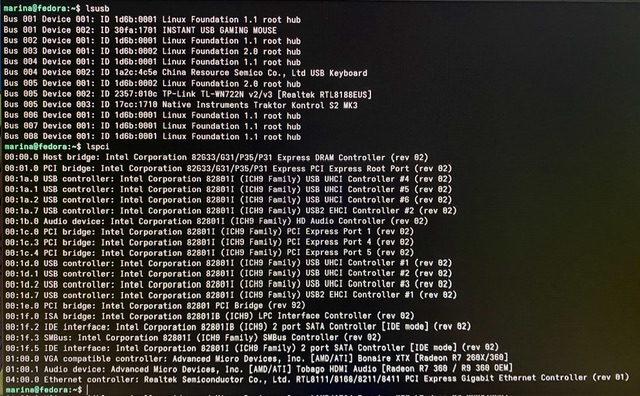
lsusb
lspci
sudo nmcli
sudo nmcli device show

Also, you mentioned you just started with Fedora. Have you tried different distributions before? How did it work with them?

1 Like

We need more information. If the USB adapter is supported, it should be loaded at boot time. If you run modinfo rtl81xxxu you will see a list of firmware and then a bunch of lines starting with alias: and showing entries of the form: usb:vNNNNpMMMM. You can get the values for NNNN and MMMM for your adapter by running inxi -Nzxx where you should see chip-ID: NNNN:MMMM. If your adapter is not listed, you may need to upgrade to a supported adapter. See USB WiFi for advice on choosing USB adapters.

If your model is listed, look for error messages, run journalctl --no-hostname --no-pager -b -g <search_string>, using search strings like wifi and r81. You should be able to copy journalctl output as plain text to a USB key so you can post it (as reformatted text using the </> button from the top line of the text entry panel).

1 Like

Thank you so much for answering, here are the screenshots:


I will copy-paste the boot output in a few minutes!

Hi, thx for answering!

Here is what I get when searching for “wifi”:

Jul 20 04:57:07 kernel: usb 5-1: This Realtek USB WiFi dongle (0x2357:0x010c) is untested!
Jul 20 04:57:08 kernel: usb 5-1: RTL8188EU rev D (TSMC) romver 0, 1T1R, TX queues 2, WiFi=1, BT=0, GPS=0, HI PA=0
Jul 20 04:57:08 kernel: usb 5-1: rtl8xxxu: Loading firmware rtlwifi/rtl8188eufw.bin
Jul 20 04:57:08 NetworkManager[827]: <info>  [1752980228.4016] Read config: /etc/NetworkManager/NetworkManager.conf, /usr/lib/NetworkManager/conf.d/{20-connectivity-fedora.conf,22-wifi-mac-addr.conf,99-nvme-nbft-no-ignore-carrier.conf}
Jul 20 04:57:08 NetworkManager[827]: <info>  [1752980228.5589] Loaded device plugin: NMWifiFactory (/usr/lib64/NetworkManager/1.52.0-1.fc42/libnm-device-plugin-wifi.so)

And here is search for “r81”:

Jul 20 06:56:52 kernel: percpu: Embedded 88 pages/cpu s237568 r8192 d114688 u524288
Jul 20 06:56:52 kernel: pcpu-alloc: s237568 r8192 d114688 u524288 alloc=1*2097152
Jul 20 04:57:05 kernel: r8169 0000:04:00.0: can't disable ASPM; OS doesn't have ASPM control
Jul 20 04:57:06 kernel: r8169 0000:04:00.0 eth0: RTL8168b/8111b, 00:1d:7d:e9:2e:62, XID 380, IRQ 16
Jul 20 04:57:06 kernel: r8169 0000:04:00.0 eth0: jumbo features [frames: 4074 bytes, tx checksumming: ko]
Jul 20 04:57:06 kernel: r8169 0000:04:00.0 enp4s0: renamed from eth0
Jul 20 04:57:08 kernel: RTL8211B Gigabit Ethernet r8169-0-400:00: attached PHY driver (mii_bus:phy_addr=r8169-0-400:00, irq=MAC)
Jul 20 04:57:08 kernel: r8169 0000:04:00.0 enp4s0: Link is Down
Jul 20 15:24:12 kernel: RTL8211B Gigabit Ethernet r8169-0-400:00: attached PHY driver (mii_bus:phy_addr=r8169-0-400:00, irq=MAC)
Jul 20 15:24:12 kernel: r8169 0000:04:00.0 enp4s0: Link is Down
Jul 20 15:41:51 kernel: RTL8211B Gigabit Ethernet r8169-0-400:00: attached PHY driver (mii_bus:phy_addr=r8169-0-400:00, irq=MAC)
Jul 20 15:41:51 kernel: r8169 0000:04:00.0 enp4s0: Link is Down

I will check to see if my adapter is listed in a minute, and I have uploaded some screenshots in my other answer, thank you so much for the help!

I couldn’t paste here the whole journalctl log for it is too long, but I have it uploaded here if you find the will and the time!

It seems as though the system can find the adapter and that the drivers are there, but I probably can’t get them to install which is a skill issue, so thanks for reaching out.

EDIT:
Oh I have just realized that this probably mean the adapter is not supported?

This Realtek USB WiFi dongle (0x2357:0x010c) is untested!

Here is the problem (from your logs:

Jul 20 04:57:08 kernel: usbcore: registered new interface driver rtl8xxxu
Jul 20 04:57:08 kernel: rtl8xxxu 5-1:1.0: probe with driver rtl8xxxu failed with error -11
Jul 20 04:57:08 kernel: usb 5-1: Firmware failed to start
Jul 20 04:57:08 kernel: usb 5-1: Firmware revision 28.0 (signature 0x88e1)
Jul 20 04:57:08 kernel: usb 5-1: rtl8xxxu: Loading firmware rtlwifi/rtl8188eufw.bin
Jul 20 04:57:08 kernel: usb 5-1: RTL8188EU MAC: c0:25:e9:2a:e6:09
Jul 20 04:57:08 kernel: usb 5-1: RTL8188EU rev D (TSMC) romver 0, 1T1R, TX queues 2, WiFi=1, BT=0, GPS=0, HI PA=0
Jul 20 04:57:08 kernel: 000001f0: ff ff ff ff ff ff ff ff ff ff ff ff ff ff ff ff  ................
Jul 20 04:57:08 kernel: 000001e0: ff ff ff ff ff ff ff ff ff ff ff ff ff ff ff ff  ................
Jul 20 04:57:08 kernel: 000001d0: ff ff ff ff ff ff ff ff ff ff ff ff ff ff ff ff  ................
Jul 20 04:57:08 kernel: 000001c0: ff ff ff ff ff ff ff ff ff ff ff ff ff ff ff ff  ................
Jul 20 04:57:08 kernel: 000001b0: ff ff ff ff ff ff ff ff ff ff ff ff ff ff ff ff  ................
Jul 20 04:57:08 kernel: 000001a0: ff ff ff ff ff ff ff ff ff ff ff ff ff ff ff ff  ................
Jul 20 04:57:08 kernel: 00000190: ff ff ff ff ff ff ff ff ff ff ff ff ff ff ff ff  ................
Jul 20 04:57:08 kernel: 00000180: ff ff ff ff ff ff ff ff ff ff ff ff ff ff ff ff  ................
Jul 20 04:57:08 kernel: 00000170: ff ff ff ff ff ff ff ff ff ff ff ff ff ff ff ff  ................
Jul 20 04:57:08 kernel: 00000160: ff ff ff ff ff ff ff ff ff ff ff ff ff ff ff ff  ................
Jul 20 04:57:08 kernel: 00000150: ff ff ff ff ff ff ff ff ff ff ff ff ff ff ff ff  ................
Jul 20 04:57:08 kernel: 00000140: ff ff ff ff ff ff ff ff ff ff ff ff ff ff ff ff  ................
Jul 20 04:57:08 kernel: 00000130: 81 ae 96 2d 03 93 96 11 fc 8c 00 11 9b ff ff ff  ...-............
Jul 20 04:57:08 kernel: 00000120: ff ff ff ff ff ff ff ff ff ff ff ff ff ff ff ff  ................
Jul 20 04:57:08 kernel: 00000110: ff ff ff ff ff ff ff ff ff ff ff ff ff ff ff ff  ................
Jul 20 04:57:08 kernel: 00000100: ff ff ff ff ff ff ff ff ff ff ff ff ff ff ff ff  ................
Jul 20 04:57:08 kernel: 000000f0: 4e 49 43 0c 03 30 30 45 30 34 43 30 30 30 31 00  NIC..00E04C0001.
Jul 20 04:57:08 kernel: 000000e0: 65 61 6c 74 65 6b 0d 03 38 30 32 2e 31 31 6e 20  ealtek..802.11n 
Jul 20 04:57:08 kernel: 000000d0: 57 23 0c 01 43 66 00 c0 25 e9 2a e6 09 09 03 52  W#..Cf..%.*....R
Jul 20 04:57:08 kernel: 000000c0: 00 00 00 10 00 00 00 00 00 03 ff ff ff ff ff ff  ................
Jul 20 04:57:08 kernel: 000000b0: ff ff ff ff ff ff ff ff a1 20 16 00 00 00 00 00  ......... ......
Jul 20 04:57:08 kernel: 000000a0: ff ff ff ff ff ff ff ff ff ff ff ff ff ff ff ff  ................
Jul 20 04:57:08 kernel: 00000090: ff ff ff ff ff ff ff ff ff ff ff ff ff ff ff ff  ................
Jul 20 04:57:08 kernel: 00000080: ff ff ff ff ff ff ff ff ff ff ff ff ff ff ff ff  ................
Jul 20 04:57:08 kernel: 00000070: ff ff ff ff ff ff ff ff ff ff ff ff ff ff ff ff  ................
Jul 20 04:57:08 kernel: 00000060: ff ff ff ff ff ff ff ff ff ff ff ff ff ff ff ff  ................
Jul 20 04:57:08 kernel: 00000050: ff ff ff ff ff ff ff ff ff ff ff ff ff ff ff ff  ................
Jul 20 04:57:08 kernel: 00000040: ff ff ff ff ff ff ff ff ff ff ff ff ff ff ff ff  ................
Jul 20 04:57:08 kernel: 00000030: ff ff ff ff ff ff ff ff ff ff ff ff ff ff ff ff  ................
Jul 20 04:57:08 kernel: 00000020: ff ff ff ff ff ff ff ff ff ff ff ff ff ff ff ff  ................
Jul 20 04:57:08 kernel: 00000010: 2d 2d 2b 2b 2b 2b 31 31 30 2f 2e 01 ff ff ff ff  --++++110/......
Jul 20 04:57:08 kernel: 00000000: 29 81 00 6c 0b 00 00 00 00 0c 00 00 00 00 00 00  )..l............
Jul 20 04:57:08 kernel: usb 5-1: Dumping efuse for RTL8188EU (0x200 bytes):
Jul 20 04:57:08 kernel: usb 5-1: Please report results to Jes.Sorensen@gmail.com
Jul 20 04:57:07 kernel: usb 5-1: This Realtek USB WiFi dongle (0x2357:0x010c) is untested!

So the kernel can find a driver for that, but it fails. I’ll have another look on the logs about more details.

1 Like

First, can you give me the output of cat /proc/sys/kernel/tainted ?

Second, I also see two kernel warnings that, at least at first glance, look unrelated (this does not need to be somethign serious), but it leads to a different problem:

Jul 20 06:56:52 kernel: Linux version 6.14.0-63.fc42.x86_64 (mockbuild@d5701c6d040c430c8283c8c9847dc93f) (gcc (GCC) 15.0.1 20250228 (Red Hat 15.0.1-0), GNU ld version 2.44-3.fc42) #1 SMP PREEMPT_DYNAMIC Mon Mar 24 19:53:37 UTC 2025

→ Before going ahead with anything else, or checking if the origin of your issue is a bug, we need to update your kernel: you run a very old kernel that is no longer supported. If this is a bug, it might be already solved, and a simple update could solve all issues you have.

Is it possible that you add your computer temporarily once to any Internet connection by different means and do a dnf update -y (that would once get all updates to make the system up to date, including kernel) and then reboot ? (that obviously would be easiest from a troubleshooting point of view)

Further, just to have it once asked explicitly: you run Windows on the same machine with this very WiFi device? And it works?


Anyway, in kernel things, we have to be careful, and there are two kernel warnings that indicate an radeon-related issue (how old is your machine? can you add lscpu output?), and in kernel issues, the logs can sometimes be themselves just a symptom of a deeper cause (there are now at least 3 issues, though only one causes issues), so I do not want to determine the origin at this time, but if the WiFi device works on Windows, I tend to assume it is a bug in the driver.

I am not an expert in this very area, but the kernel gets that there is a problem, and it suggests that you write an email to the maintainer (email address contained in the logs), but the maintainer will be only able to help if you tested in advance the current kernel, and as mentioned, if it is a bug, it might be already solved in the current kernel. So I would make the update of the kernel, or at the best the whole system, to the first priority.

At the worst, if you cannot do update with a different Internet connection, would you be able to download something on Windows or so, and then put it on a device that can be read by the Fedora? E.g., a USB storage or so that has a file system readable by both systems? Several GB at least. Then we might try to install manually the updates from the storage.
1 Like

If we can try this, you might go to this page: kernel-6.15.6-200.fc42 | Build Info | koji

I presume that you have x86_64 (you can check with uname -r). If so, download on that page the following files on your USB storage (or whatever you use to get files from Windows to Fedora).

kernel-6.15.6-200.fc42.x86_64.rpm
kernel-core-6.15.6-200.fc42.x86_64.rpm 
kernel-modules-6.15.6-200.fc42.x86_64.rpm
kernel-modules-core-6.15.6-200.fc42.x86_64.rpm
kernel-modules-extra-6.15.6-200.fc42.x86_64.rpm
kernel-modules-extra-matched-6.15.6-200.fc42.x86_64.rpm
kernel-modules-internal-6.15.6-200.fc42.x86_64.rpm
kernel-selftests-internal-6.15.6-200.fc42.x86_64.rpm
kernel-tools-6.15.6-200.fc42.x86_64.rpm
kernel-tools-libs-6.15.6-200.fc42.x86_64.rpm 
kernel-uki-virt-6.15.6-200.fc42.x86_64.rpm
kernel-uki-virt-addons-6.15.6-200.fc42.x86_64.rpm
libperf-6.15.6-200.fc42.x86_64.rpm
libperf-devel-6.15.6-200.fc42.x86_64.rpm
perf-6.15.6-200.fc42.x86_64.rpm
python3-perf-6.15.6-200.fc42.x86_64.rpm
rtla-6.15.6-200.fc42.x86_64.rpm
rv-6.15.6-200.fc42.x86_64.rpm 

Then, bring them to Fedora, enter a terminal, go with cd to the very folder of these files, and then do the following (this is one command):

dnf update \
kernel-6.15.6-200.fc42.x86_64.rpm \
kernel-core-6.15.6-200.fc42.x86_64.rpm \
kernel-modules-6.15.6-200.fc42.x86_64.rpm \
kernel-modules-core-6.15.6-200.fc42.x86_64.rpm \
kernel-modules-extra-6.15.6-200.fc42.x86_64.rpm \
kernel-modules-extra-matched-6.15.6-200.fc42.x86_64.rpm \
kernel-modules-internal-6.15.6-200.fc42.x86_64.rpm \
kernel-selftests-internal-6.15.6-200.fc42.x86_64.rpm \
kernel-tools-6.15.6-200.fc42.x86_64.rpm \
kernel-tools-libs-6.15.6-200.fc42.x86_64.rpm \
kernel-uki-virt-6.15.6-200.fc42.x86_64.rpm \
kernel-uki-virt-addons-6.15.6-200.fc42.x86_64.rpm \
libperf-6.15.6-200.fc42.x86_64.rpm \
libperf-devel-6.15.6-200.fc42.x86_64.rpm \
perf-6.15.6-200.fc42.x86_64.rpm \
python3-perf-6.15.6-200.fc42.x86_64.rpm \
rtla-6.15.6-200.fc42.x86_64.rpm \
rv-6.15.6-200.fc42.x86_64.rpm \

→ your system will likely ignore many of these files, but to minimize likelihood of issues, let’s add all of these files to ensure the system has what it wants. It will only update what is necessary, and leave the others automatically out.

If everything is fine, it will tell you what will be updated and give you the chance to say y/n to the updates. If it mentions an error, or if it says some dependencies cannot be fulfilled, let us know details. Do not enforce the update if errors are mentioned.

I don’t like to update an old Fedora to the newest kernel without other updates, but it is worth a try to see if it maybe solves the issue if you cannot update the machine with a direct Internet connection.

Anyway, if the update works, wait it to be finished, and once it is done, reboot. Then check the output of uname -r and if the wifi then works. Looking forward to see how it goes with 6.15.6!

1 Like

The output of cat /proc/sys/kernel/tainted returns 0.

I am running Windows and Linux on the same computer as dualboot, and the WiFi on Windows is working without any problems. However, it is a pretty weak computer as I have built it from anything I could find during the pandemic, more as a learning opportunity than to use it as a primary computer. But my laptop is broken so I will probably rather upgrade the hardware on the desktop computer than buy a new one.

I think I can connect it with a cable to the internet, although I was trying to avoid the process of carrying the whole setup to the router because it is a flight of stairs away and not in my apartment, but it is doable!

Here are the specs:

marina@fedora:~$ lscpu
Architecture:             x86_64
  CPU op-mode(s):         32-bit, 64-bit
  Address sizes:          36 bits physical, 48 bits virtual
  Byte Order:             Little Endian
CPU(s):                   2
  On-line CPU(s) list:    0,1
Vendor ID:                GenuineIntel
  Model name:             Intel(R) Core(TM)2 Duo CPU     E7200  @ 2.53GHz
    CPU family:           6
    Model:                23
    Thread(s) per core:   1
    Core(s) per socket:   2
    Socket(s):            1
    Stepping:             6
    CPU(s) scaling MHz:   106%
    CPU max MHz:          2400.0000
    CPU min MHz:          1600.0000
    BogoMIPS:             5066.83
    Flags:                fpu vme de pse tsc msr pae mce cx8 apic sep mtrr pge mca cmov pat pse36 clflush dts acpi mmx fxsr sse sse2 ht tm 
                          pbe syscall nx lm constant_tsc arch_perfmon pebs bts rep_good nopl cpuid aperfmperf pni dtes64 monitor ds_cpl est
                           tm2 ssse3 cx16 xtpr pdcm sse4_1 lahf_lm pti dtherm
Caches (sum of all):      
  L1d:                    64 KiB (2 instances)
  L1i:                    64 KiB (2 instances)
  L2:                     3 MiB (1 instance)
NUMA:                     
  NUMA node(s):           1
  NUMA node0 CPU(s):      0,1
Vulnerabilities:          
  Gather data sampling:   Not affected
  Ghostwrite:             Not affected
  Itlb multihit:          KVM: Mitigation: VMX unsupported
  L1tf:                   Mitigation; PTE Inversion
  Mds:                    Vulnerable: Clear CPU buffers attempted, no microcode; SMT disabled
  Meltdown:               Mitigation; PTI
  Mmio stale data:        Unknown: No mitigations
  Reg file data sampling: Not affected
  Retbleed:               Not affected
  Spec rstack overflow:   Not affected
  Spec store bypass:      Vulnerable
  Spectre v1:             Mitigation; usercopy/swapgs barriers and __user pointer sanitization
  Spectre v2:             Mitigation; Retpolines; STIBP disabled; RSB filling; PBRSB-eIBRS Not affected; BHI Not affected
  Srbds:                  Not affected
  Tsx async abort:        Not affected

I will try this, thank you so so much! :pink_heart:

I retired 2018, but during COVID many users in my field had been using high-end linux systems supported by IT at their institution and suddenly had to find ways to work from home with little help from IT support people and needing to install linux on personal laptops or do their work in WSL.

There are now bargain prices for “refurbished enterprise grade” systems that either don’t meet the official specs to support Windows 11 or were used by enterprises (including the US government and Intel) reducing staff.

USB WiFi dongles are not expensive and are (too?) often useful when a linux upgrade breaks the internal WiFi.