I am using Dual Boot with Windows 11 and Fedora 42. I am a single user on the laptop.
Problem - 1
-
I have deleted some files in
/home/.configand/home/.cache -
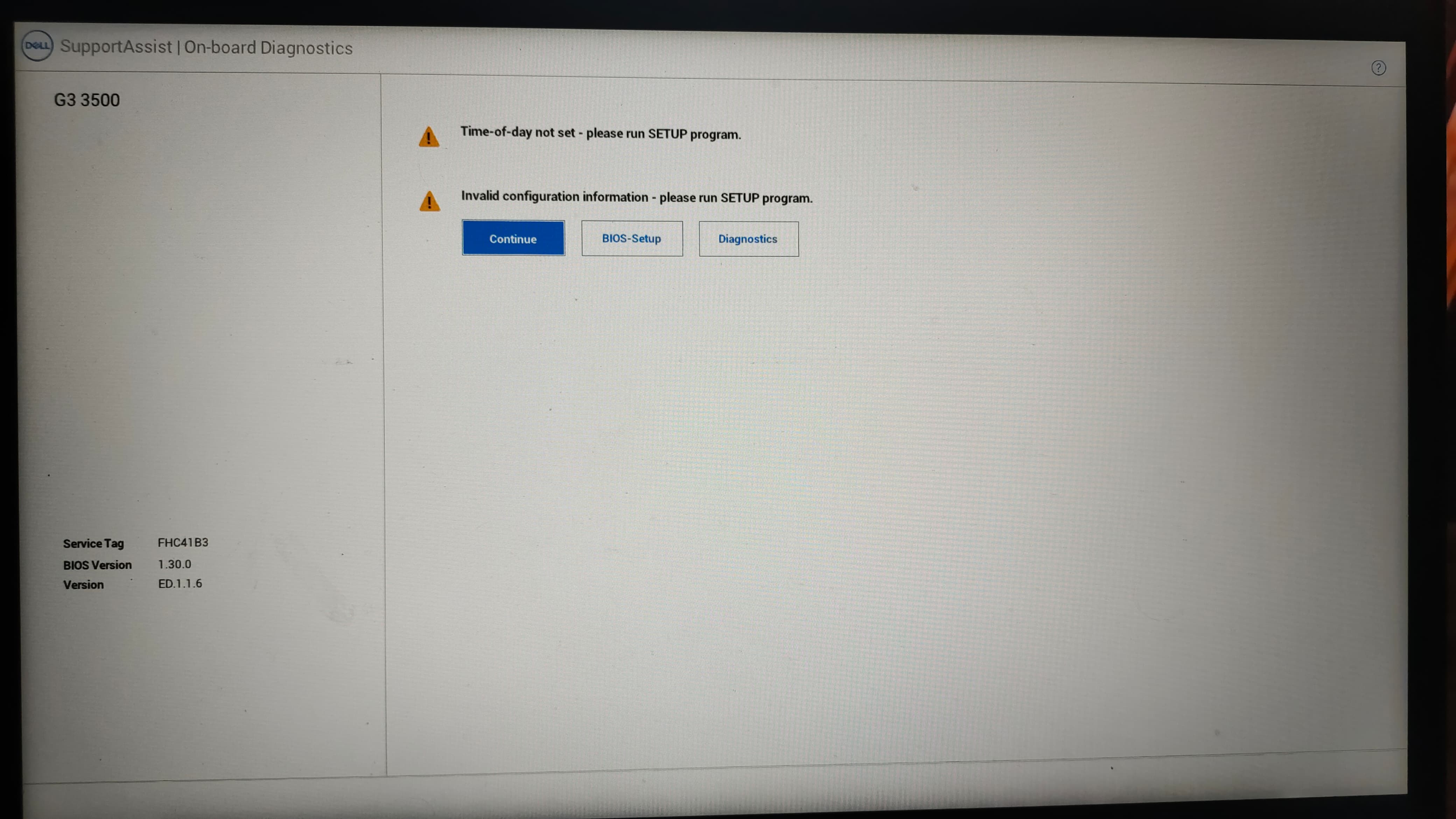
After that, When I turned on my laptop the next day. It keeps restarting with my keyboard lights on and off for a while, then Pressed
F12which showing the below
-
Then I press continue. Now it shows the normal grub menu.
Problem - 2
I am bit confused with the partitioning in my laptop, where it has alot of partition of windows and fedora, Should I re-install the fedora 42 again.
Here is my partition,
deekshithbangi@fedora:~$ lsblk -l
NAME      MAJ:MIN RM   SIZE RO TYPE MOUNTPOINTS
zram0     251:0    0   7.5G  0 disk [SWAP]
nvme0n1   259:0    0 476.9G  0 disk
nvme0n1p1 259:1    0   500M  0 part /boot/efi
nvme0n1p2 259:2    0   128M  0 part
nvme0n1p3 259:3    0 328.8G  0 part
nvme0n1p4 259:4    0   1.2G  0 part
nvme0n1p5 259:5    0     1G  0 part /boot
nvme0n1p6 259:6    0   124G  0 part /home
                                    /
nvme0n1p7 259:7    0   990M  0 part
nvme0n1p8 259:8    0    19G  0 part
nvme0n1p9 259:9    0   1.4G  0 part

deekshithbangi@fedora:~$ sudo fdisk -l
Disk /dev/nvme0n1: 476.94 GiB, 512110190592 bytes, 1000215216 sectors
Disk model: KBG40ZNS512G NVMe KIOXIA 512GB
Units: sectors of 1 * 512 = 512 bytes
Sector size (logical/physical): 512 bytes / 512 bytes
I/O size (minimum/optimal): 512 bytes / 512 bytes
Disklabel type: gpt
Disk identifier: 4D8F2105-AEBB-4FA8-8264-FEF89837AF62

Device             Start        End   Sectors   Size Type
/dev/nvme0n1p1      2048    1026047   1024000   500M EFI System
/dev/nvme0n1p2   1026048    1288191    262144   128M Microsoft reserved
/dev/nvme0n1p3   1288192  690786303 689498112 328.8G Microsoft basic data
/dev/nvme0n1p4 690786304  693270527   2484224   1.2G Windows recovery environment
/dev/nvme0n1p5 693272576  695369727   2097152     1G Linux extended boot
/dev/nvme0n1p6 695369728  955416575 260046848   124G Linux filesystem
/dev/nvme0n1p7 955416576  957444095   2027520   990M Windows recovery environment
/dev/nvme0n1p8 957444096  997304319  39860224    19G Linux filesystem
/dev/nvme0n1p9 997306368 1000175615   2869248   1.4G Windows recovery environment


Disk /dev/zram0: 7.54 GiB, 8098152448 bytes, 1977088 sectors
Units: sectors of 1 * 4096 = 4096 bytes
Sector size (logical/physical): 4096 bytes / 4096 bytes
I/O size (minimum/optimal): 4096 bytes / 4096 bytes
deekshithbangi@fedora:~$ df -h
Filesystem      Size  Used Avail Use% Mounted on
/dev/nvme0n1p6  124G   30G   93G  24% /
devtmpfs        3.8G     0  3.8G   0% /dev
tmpfs           3.8G   34M  3.8G   1% /dev/shm
efivarfs        374K  163K  207K  44% /sys/firmware/efi/efivars
tmpfs           1.6G  2.3M  1.6G   1% /run
tmpfs           1.0M     0  1.0M   0% /run/credentials/systemd-journald.service
/dev/nvme0n1p6  124G   30G   93G  24% /home
tmpfs           3.8G   11M  3.8G   1% /tmp
/dev/nvme0n1p5  974M  487M  420M  54% /boot
/dev/nvme0n1p1  496M  106M  391M  22% /boot/efi
tmpfs           1.0M     0  1.0M   0% /run/credentials/systemd-resolved.service
tmpfs           773M  168K  773M   1% /run/user/1000
deekshithbangi@fedora:~$

 Shared
 / and /home: Both are mounted on the same partition (nvme0n1p6). This is fine, but if you ever want to isolate user data from system files, you could consider splitting them.